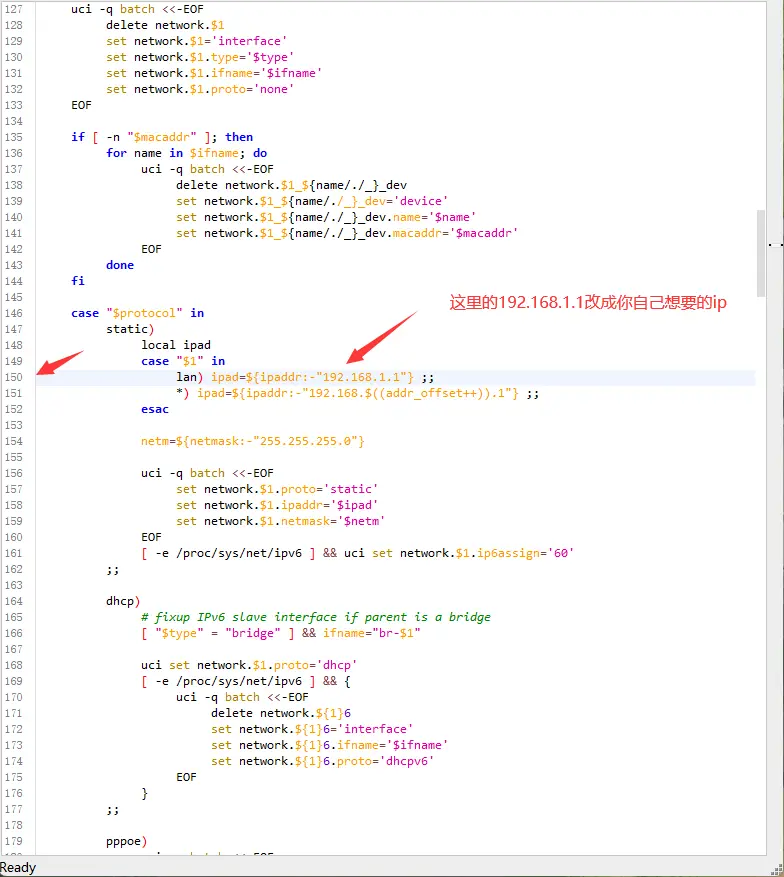
1.修改默认源码的IP地址 我们找到源码的配置文件地址(这里以lede为例) package/base-files/files/bin/config_generate
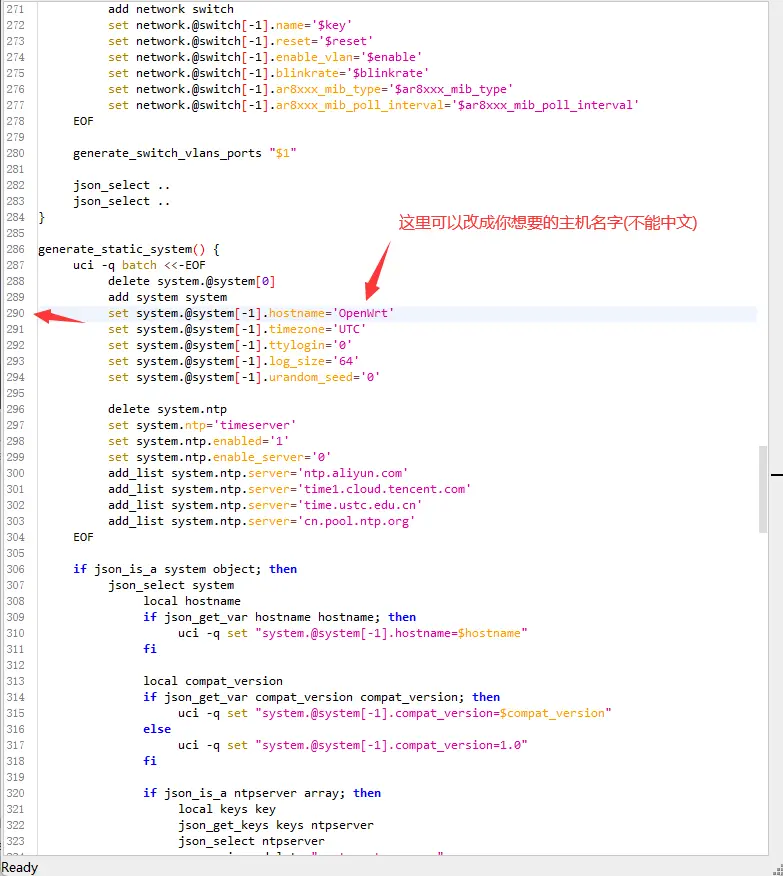
继续修改主机名
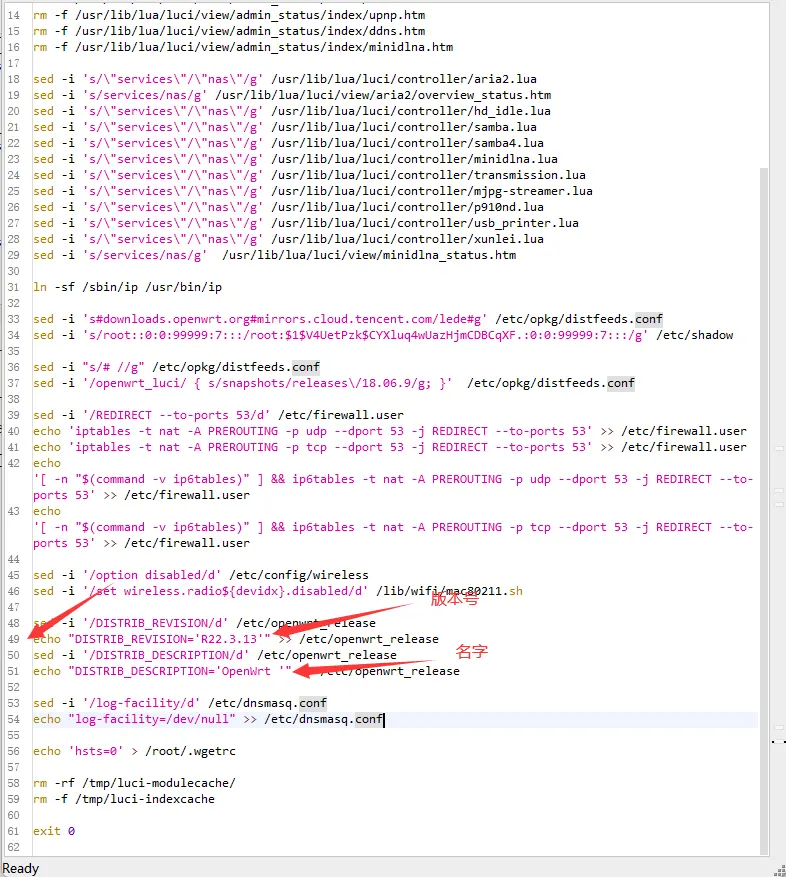
2.修改版本号 我们修改 lede/package/lean/default-settings/files/zzz-default-settings 文件中的 R22.3.1 3 及 OpenWrt 。(注意OpenWrt 后面的空格)
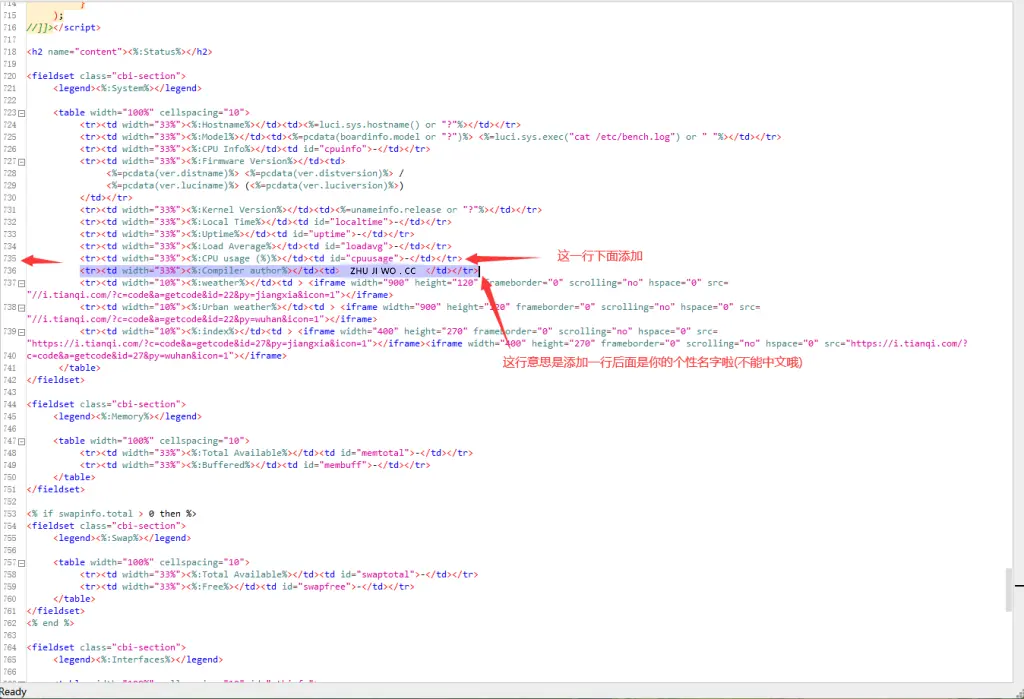
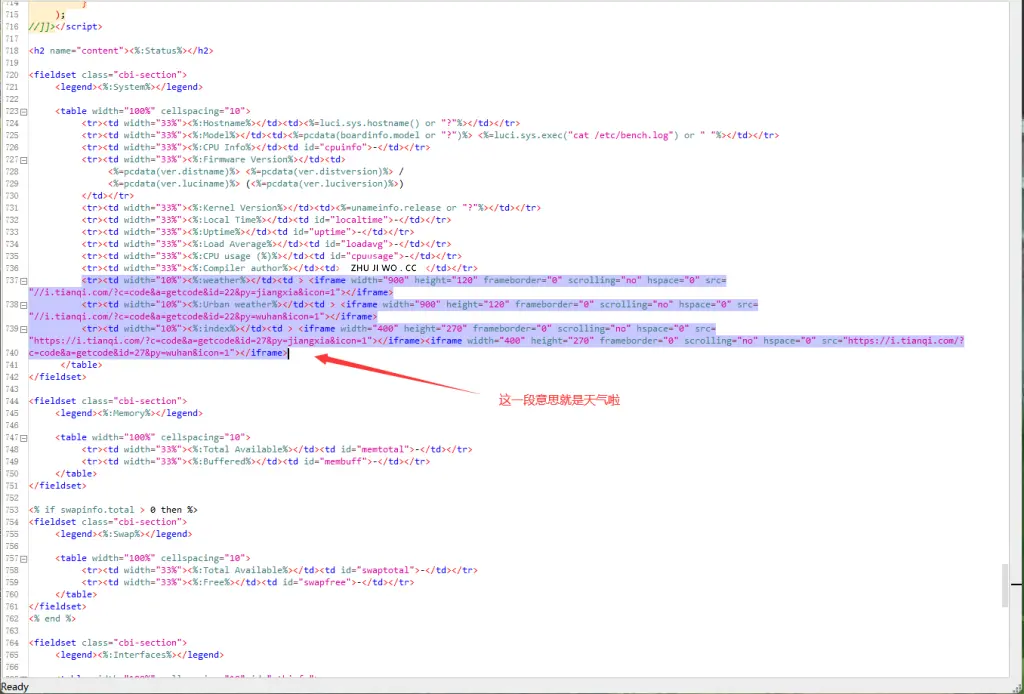
3.系统信息内添加编译者信息 我们修改lede/package/lean/autocore/files/arm/index.htm 及 lede/package/lean/autocore/files/x86/index.htm
1 <tr><td width="33%"><%:Compiler author%></td><td>https://kls.red</td></tr>
https://www.zhujiwo.cc 部分改成你自己的(不能中文)
继续添加主页天气信息
1 2 3 <tr > <td width ="10%" > <%:weather%></td > <td > <iframe width ="900" height ="120" frameborder ="0" scrolling ="no" hspace ="0" src ="//i.tianqi.com/?c=code&a=getcode&id=22&py=jiangxia&icon=1" > </iframe > <tr > <td width ="10%" > <%:Urban weather%></td > <td > <iframe width ="900" height ="120" frameborder ="0" scrolling ="no" hspace ="0" src ="//i.tianqi.com/?c=code&a=getcode&id=22&py=wuhan&icon=1" > </iframe > <tr > <td width ="10%" > <%:index%></td > <td > <iframe width ="400" height ="270" frameborder ="0" scrolling ="no" hspace ="0" src ="https://i.tianqi.com/?c=code&a=getcode&id=27&py=jiangxia&icon=1" > </iframe > <iframe width ="400" height ="270" frameborder ="0" scrolling ="no" hspace ="0" src ="https://i.tianqi.com/?c=code&a=getcode&id=27&py=wuhan&icon=1" > </iframe >
代码里面的 py= 后面拼音改成你城市的地区拼音
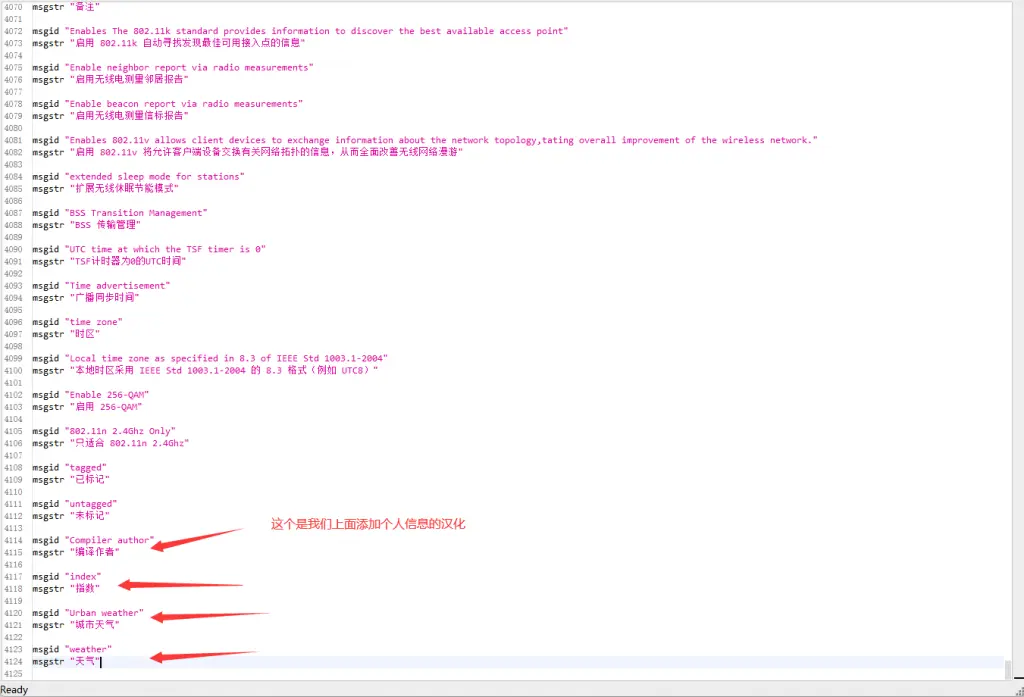
接下来我们给我们添加的代码添加汉化
我们找到这个配置文件 lede/feeds/luci/modules/luci-base/po/zh-cn/base.po
1
2
3
4
5
6
7
8
9
10
11
msgid "Compiler author" msgstr "编译作者" msgid "index" msgstr "指数" msgid "Urban weather" msgstr "城市天气" msgid "weather" msgstr "天气"
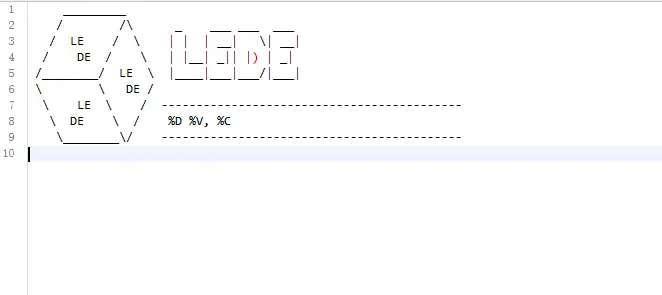
4.定制个性SSH登陆欢迎信息 我们修改lede/package/basecd-files/files/etc/banner文件,可以到这里定制。http://patorjk.com/software/taag/
这里就看你们自己啦
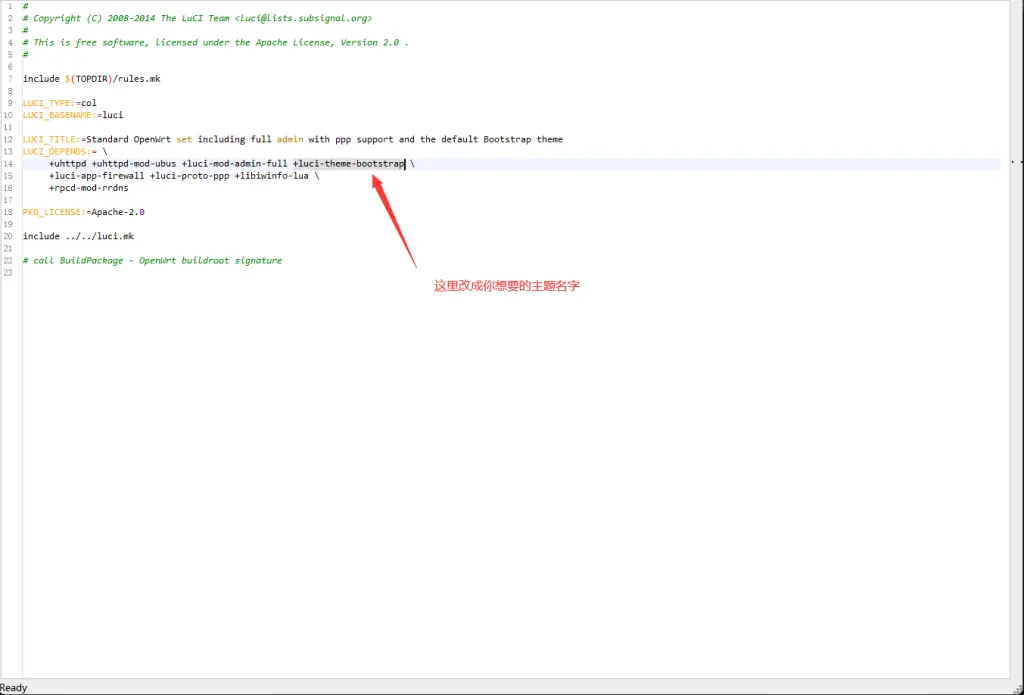
5.修改默认主题 我们修改 lede/feeds/luci/collections/luci/Makefile 文件更改默认主题
1
2
lede/feeds/luci/collections/luci-ssl-nginx/Makefile lede/feeds/luci/collections/luci-ssl-openssl/Makefile
这三个文件都要修改默认主题名字,不然后面编译可能会报错。
恩山论坛上有很多用户编译好的现成固件,自己编译固件最大的优势是可以根据需求更好的自定义,建议没有特别需求的用户还是直接选用现成的固件即可。编译固件也是一种乐趣,整个过程大约1-3小时左右,需要耐心等待。
环境要求
系统版本
Debian 11 或者 Ubuntu LTS
网络要求
最好是境外主机或者能够访问国际网络,大陆网络环境编译失败率较高,配置推荐 2H4G 以上
编译依赖
1 2 3 4 5 6 7 8 9 10 11 12 13 sudo apt update -ysudo apt full-upgrade -ysudo apt install -y ack antlr3 aria2 asciidoc autoconf automake autopoint binutils bison build-essential \bzip2 ccache cmake cpio curl device-tree-compiler fastjar flex gawk gettext gcc-multilib g++-multilib \ git gperf haveged help2man intltool libc6-dev-i386 libelf-dev libglib2.0-dev libgmp3-dev libltdl-dev \ libmpc-dev libmpfr-dev libncurses5-dev libncursesw5-dev libreadline-dev libssl-dev libtool lrzsz \ mkisofs msmtp nano ninja-build p7zip p7zip-full patch pkgconf python2.7 python3 python3-pip libpython3-dev qemu-utils \ rsync scons squashfs-tools subversion swig texinfo uglifyjs upx-ucl unzip vim wget xmlto xxd zlib1g-dev sudo apt autoremove --purgesudo apt clean
开始编译
新建一个用户,用于编译固件
1
2
3
4
5
6
7
8
9
useradd -m openwrt apt install -y sudo usermod -s /bin/bash openwrt su openwrt cd ~
拉取源码,这里用的是 Lean 大佬的 LEDE 分支源码
1
2
git clone https://github.com/coolsnowwolf/lede cd lede
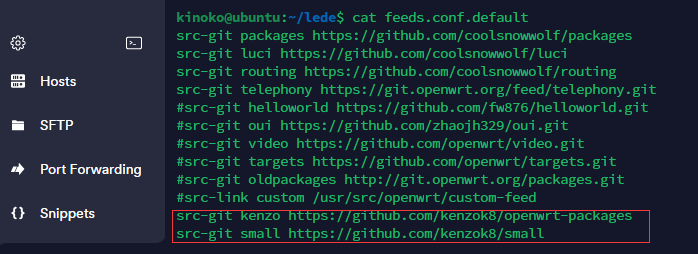
添加软件源,L大源码里默认有四个软件源里面包含了大部分常用插件,如果要添加其他没有的插件则需要自行添加软件源至
1
2
3
4
# 添加 small-package源 https://github.com/kenzok8/small-package sed -i '$a src-git smpackage https://github.com/kenzok8/small-package' feeds.conf.default # 对于强迫症的同学(有报错信息、或Lean源码编译出错的情况),请尝试删除冲突的插件 rm -rf feeds/smpackage/{base-files,dnsmasq,firewall*,fullconenat,libnftnl,nftables,ppp,opkg,ucl,upx,vsftpd*,miniupnpd-iptables,wireless-regdb}
1
2
3
4
5
6
7
8
# 不推荐,好像有问题 # 删除L大的argon主题() rm -rf feeds/luci/themes/luci-theme-argon rm -rf feeds/luci/applications/luci-app-argon-config # 替换成smpackage的argon cp feeds/smpackage/luci-theme-argon feeds/luci/themes/luci-theme-argon -r cp feeds/smpackage/luci-app-argon-config feeds/luci/applications/luci-app-argon-config -r
文件,当然也可以单独添加某个插件
1
2
3
4
5
6
7
8
9
10
11
12
13
14
15
16
vim feeds.conf.default src-git kenzo https://github.com/kenzok8/openwrt-packages src-git small https://github.com/kenzok8/small src-git haibo https://github.com/haiibo/openwrt-packages src-git liuran001 https://github.com/liuran001/openwrt-packages git clone https://github.com/esirplayground/luci-app-poweroff.git package/luci-app-poweroff ./scripts/feeds clean ./scripts/feeds update -a ./scripts/feeds install -a
自定义配置
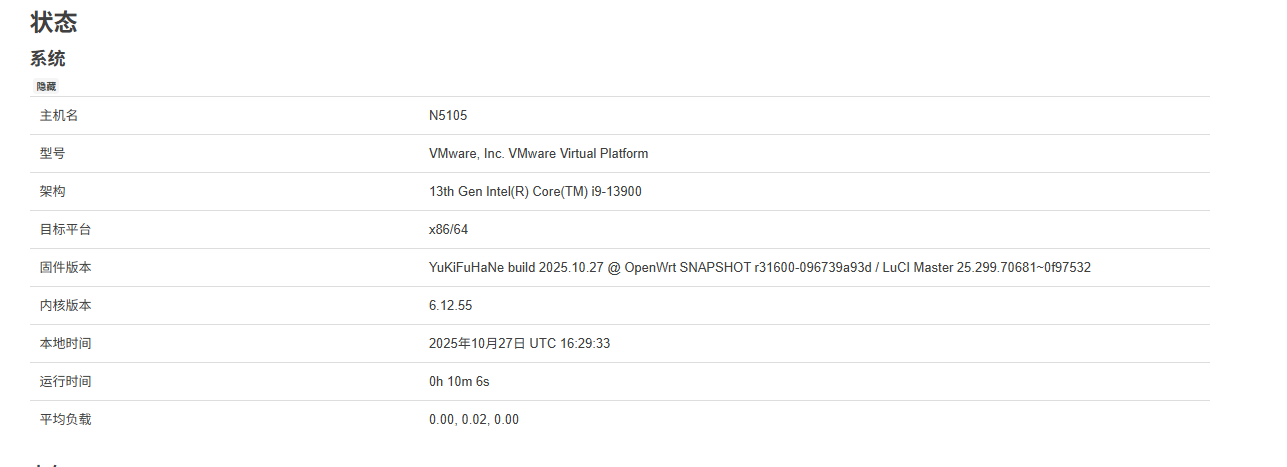
1 2 3 4 5 6 7 8 9 10 11 12 13 14 15 sed -i 's/192.168.1.1/192.168.6.1/g' package/base-files/files/bin/config_generate sed -i "s/set system\.@system\[-1\]\.hostname='OpenWrt'/set system\.@system\[-1\]\.hostname='N5105'/" package/base-files/files/bin/config_generate sed -i "s/OpenWrt /YuKiFuHaNe build $(TZ=UTC-8 date "+%Y.%m.%d" ) @ OpenWrt /g" package/lean/default-settings/files/zzz-default-settings sed -i "s/luci-theme-bootstrap/luci-theme-argon-mod/g" feeds/luci/collections/luci/Makefile
加入编译者OpenWrt
方法1:修改 include/version.mk(推荐) 编辑 include/version.mk 文件:
1 2 3 4 5 6 7 8 VERSION_DIST:=$(call qstrip,$(CONFIG_VERSION_DIST) ) VERSION_DIST:=$(if $(VERSION_DIST) ,$(VERSION_DIST) ,YuKiFuHaNe build $(shell TZ=UTC-8 date "+%Y.%m.%d" ) @ OpenWrt) VERSION_DIST_SANITIZED:=$(call sanitize,$(VERSION_DIST) )
1 2 _BUILD_DATE:=$(shell TZ=Asia/Shanghai date "+%Y.%m.%d" ) VERSION_DIST:=$(if $(VERSION_DIST) ,$(VERSION_DIST) ,YuKiFuHaNe build $(_BUILD_DATE) @ OpenWrt)
1
2
3
4
5
6
7
8
9
10
11
12
13
14
15
16
17
18
19
20
# 能ping通,但网页无法访问检查是否有开下面选项 LuCI ---> Collections ---> [*] luci Modules ---> [*] luci-mod-admin-full [*] luci-base [*] luci-compat [*] luci-mod-network [*] luci-mod-status [*] luci-mod-system Network ---> Web Servers ---> [*] uhttpd [*] uhttpd-mod-ubus Base system ---> [*] busybox # 确保包含 [*] procd # 确保包含
在OpenWrt官方检查中package_verison更严格,不能有“-“和”_“
1
2
3
4
5
# 检查所有包的版本号定义 find feeds/smpackage -name "Makefile" -exec grep -H "PKG_VERSION:=" {} \; # 检查有问题的版本号模式 find feeds/smpackage -name "Makefile" -exec grep -H "PKG_VERSION.*[_-]" {} \;
允许的字符 :
数字 0-9
英文点号 .
连字符/减号 - (但有限制)
小写字母 a-z (通常用于预发布版本如1.0_beta)
不允许的字符 :
下划线 - ❌ (始终不允许)
空格 ❌
特殊符号(@,#,$等) ❌
特殊注意事项 :
1
2
3
4
5
6
7
8
9
10
11
# 方案1:标准版本 + 构建日期作为release PKG_VERSION:=1.0.1 PKG_RELEASE:=20230405 # 方案2:带连字符的预发布版本 PKG_VERSION:=1.0.1_beta PKG_RELEASE:=1 # 方案3:完全标准版 PKG_VERSION:=1.0.1 PKG_RELEASE:=1
或者直接修改现有的版本变量:
1 VERSION_DIST := YuKiFuHaNe build $(shell TZ=UTC-8 date "+%Y.%m.%d" ) @ OpenWrt
方法2:修改 package/base-files/files/bin/config_generate 在文件末尾的 uci 设置部分添加:
1 2 uci set system.@system[0].description='YuKiFuHaNe build $(shell TZ=UTC-8 date "+%Y.%m.%d") @ OpenWrt'
完整示例:
1
2
3
4
5
uci -q batch <<-EOF set system.@system[0].hostname='OpenWrt' set system.@system[0].timezone='UTC' set system.@system[0].description='YuKiFuHaNe build $(shell TZ=UTC-8 date "+%Y.%m.%d") @ OpenWrt' EOF
方法3:创建自定义补丁文件 创建 package/base-files/patches/100-add-build-info.patch:
1 2 3 4 5 6 7 8 @@ -XX,6 +XX,7 @@ set system.@system[0].hostname='OpenWrt' set system.@system[0].timezone='UTC' set system.@system[0].log_size='64' + set system.@system[0].description='YuKiFuHaNe build $(shell TZ=UTC-8 date "+%Y.%m.%d") @ OpenWrt' EOF
方法4:修改 banner 文件 编辑 package/base-files/files/etc/banner:
1
2
3
4
5
6
7
8
_______ ________ __ | |.-----.-----.-----.| | | |.----.| |_ | - || _ | -__| || | | || _|| _| |_______|| __|_____|__|__||________||__| |____| |__| W I R E L E S S F R E E D O M ----------------------------------------------------- YuKiFuHaNe build %C @ OpenWrt, %V -----------------------------------------------------
方法5:在编译命令中指定 1 make CONFIG_VERSION_DIST="YuKiFuHaNe build $(date "+%Y.%m.%d" ) @ OpenWrt"
1
2
3
# 修改主题argon-mod中登录页面编译者为可点击 # sed -i "s/<%= ver.distversion %>/<a href=\"https:\/\/github.com\/YuKiFuHaNe\" target=\"_blank\">YuKiFuHaNe<\/a> build $(TZ=UTC-8 date "+%Y.%m.%d" ) @ OpenWrt/g" feeds/luci/themes/luci-theme-argon-mod/luasrc/view/themes/argon/footer.htm sed -i "s|<a class=\"luci-link\" href=\"{{ version.disturl }}\" target=\"_blank\">{{ version.distname }} {{ version.distversion }}-{{ version.distrevision }}</a>|<a href=\"https://github.com/YuKiFuHaNe\" target=\"_blank\">YuKiFuHaNe</a> build $(TZ=UTC-8 date \"+%Y.%m.%d\") @ OpenWrt|g" package/luci-theme-argon/ucode/template/themes/argon/footer.ut
1
2
3
4
# 电脑登陆页面 sed -i "s/<%= ver.distversion %>/<a href=\"https:\/\/github.com\/YuKiFuHaNe\" target=\"_blank\">YuKiFuHaNe<\/a> build $(TZ=UTC-8 date "+%Y.%m.%d") @ OpenWrt/g" feeds/smpackage/luci-theme-argon/luasrc/view/themes/argon/footer.htm # 手机登陆页面 sed -i "s/<%= ver.distversion %>/<a href=\"https:\/\/github.com\/YuKiFuHaNe\" target=\"_blank\">YuKiFuHaNe<\/a> build $(TZ=UTC-8 date "+%Y.%m.%d") @ OpenWrt/g" feeds/smpackage/luci-theme-argon/luasrc/view/themes/argon/footer_login.htm
执行
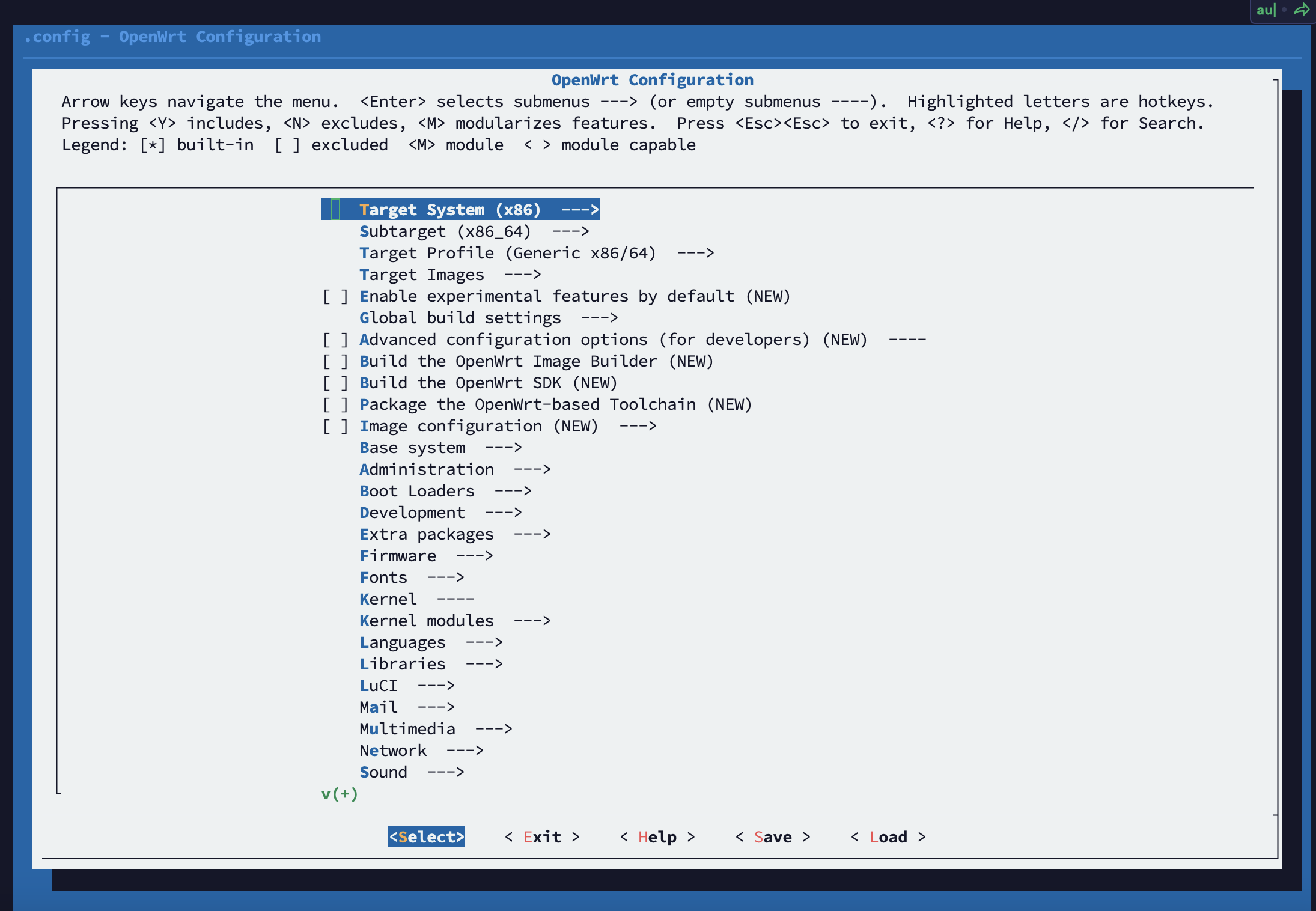
命令进入编译菜单
菜单选项简要说明:
1 2 3 4 5 6 7 8 9 10 11 12 13 14 15 16 17 18 19 20 21 22 23 24 25 26 27 28 29 30 Target System (x86) --> Subtarget (x86_64) --> Target Profile (Generic x86/64) --> Target Images --> Target Images --> (16) Kernel partition size (in MB) Target Images --> (400) Root filesystem partition size (in MB) Extra packages --> ipv6helper(选定这个后,下面几项会自动选择) Network --> odhcp6c Network --> odhcpd-ipv6only LuCI --> Protocols --> luci-proto-ipv6 LuCI --> Protocols --> luci-proto-ppp Utilities --> open-vm-tools Utilities --> open-vm-tools-fuse LuCI --> Applications LuCI --> Themes
插件中文说明对照表:https://www.right.com.cn/forum/thread-3682029-1-1.html
配置完成后使用编译菜单底部的 Save 保存,然后退出菜单 Exit,开始下载软件包
1 2 3 4 5 6 7 make download -j8 find dl -size -1024c -exec ls -l {} \; find dl -size -1024c -exec rm -f {} \;
最后编译固件,编译完成后输出路径是
,默认密码是
二次编译
拉取最新 OpenWrt 源码和更新 feeds 源中的软件包源码
1 2 3 4 cd ledegit pull ./scripts/feeds update -a ./scripts/feeds install -a
清除旧的编译产物和目录(可选)
1 2 3 4 5 6 7 make clean make dirclean
同首次编译,多线程编译失败后自动进入单线程编译,失败则输出详细日志
1 2 3 4 5 6 7 8 9 10 11 make defconfig make download -j8 find dl -size -1024c -exec ls -l {} \; make -j$(nproc ) || make -j1 || make -j1 V=s rm -rf ./tmp && rm -rf .config make menuconfig make download -j8 find dl -size -1024c -exec ls -l {} \; make -j$(nproc ) || make -j1 || make -j1 V=s
参考文档
diy-mini.sh
1 2 3 4 5 6 7 8 9 10 11 12 13 14 15 16 17 18 19 20 21 22 23 24 25 26 27 28 29 30 31 32 33 34 35 36 37 38 39 40 41 42 43 44 45 46 47 48 49 50 51 52 53 54 55 56 57 58 59 60 61 62 63 64 65 66 67 68 69 70 71 72 73 74 75 76 77 78 79 80 81 82 83 84 85 86 87 88 89 90 91 92 93 94 95 96 97 98 99 100 101 102 103 104 105 106 107 108 109 110 111 112 113 114 115 116 117 118 119 120 121 122 #!/bin/bash # 修改默认IP # sed -i 's/192.168.1.1/10.0.0.1/g' package/base-files/files/bin/config_generate # 更改默认 Shell 为 zsh # sed -i 's/\/bin\/ash/\/usr\/bin\/zsh/g' package/base-files/files/etc/passwd # TTYD 免登录 # sed -i 's|/bin/login|/bin/login -f root|g' feeds/packages/utils/ttyd/files/ttyd.config # 移除要替换的包 rm -rf feeds/packages/net/mosdns rm -rf feeds/packages/net/msd_lite rm -rf feeds/packages/net/smartdns rm -rf feeds/luci/themes/luci-theme-argon rm -rf feeds/luci/applications/luci-app-mosdns rm -rf feeds/luci/applications/luci-app-netdata # Git稀疏克隆,只克隆指定目录到本地 function git_sparse_clone() { branch="$1" repourl="$2" && shift 2 git clone --depth=1 -b $branch --single-branch --filter=blob:none --sparse $repourl repodir=$(echo $repourl | awk -F '/' '{print $(NF)}') cd $repodir && git sparse-checkout set $@ mv -f $@ ../package cd .. && rm -rf $repodir } # 添加额外插件 git clone --depth=1 https://github.com/kongfl888/luci-app-adguardhome package/luci-app-adguardhome git clone --depth=1 https://github.com/Jason6111/luci-app-netdata package/luci-app-netdata # git_sparse_clone master https://github.com/syb999/openwrt-19.07.1 package/network/services/msd_lite # 科学上网插件 git clone --depth=1 -b main https://github.com/fw876/helloworld package/luci-app-ssr-plus git clone --depth=1 https://github.com/xiaorouji/openwrt-passwall-packages package/openwrt-passwall git clone --depth=1 https://github.com/xiaorouji/openwrt-passwall package/luci-app-passwall git clone --depth=1 https://github.com/xiaorouji/openwrt-passwall2 package/luci-app-passwall2 git_sparse_clone master https://github.com/vernesong/OpenClash luci-app-openclash # Themes git clone --depth=1 -b 18.06 https://github.com/kiddin9/luci-theme-edge package/luci-theme-edge git clone --depth=1 -b 18.06 https://github.com/jerrykuku/luci-theme-argon package/luci-theme-argon git clone --depth=1 https://github.com/jerrykuku/luci-app-argon-config package/luci-app-argon-config git clone --depth=1 https://github.com/xiaoqingfengATGH/luci-theme-infinityfreedom package/luci-theme-infinityfreedom git_sparse_clone main https://github.com/haiibo/packages luci-theme-opentomcat # 更改 Argon 主题背景 cp -f $GITHUB_WORKSPACE/images/bg1.jpg package/luci-theme-argon/htdocs/luci-static/argon/img/bg1.jpg # 晶晨宝盒 git_sparse_clone main https://github.com/ophub/luci-app-amlogic luci-app-amlogic sed -i "s|firmware_repo.*|firmware_repo 'https://github.com/haiibo/OpenWrt'|g" package/luci-app-amlogic/root/etc/config/amlogic # sed -i "s|kernel_path.*|kernel_path 'https://github.com/ophub/kernel'|g" package/luci-app-amlogic/root/etc/config/amlogic sed -i "s|ARMv8|ARMv8_MINI|g" package/luci-app-amlogic/root/etc/config/amlogic # SmartDNS git clone --depth=1 -b lede https://github.com/pymumu/luci-app-smartdns package/luci-app-smartdns git clone --depth=1 https://github.com/pymumu/openwrt-smartdns package/smartdns # msd_lite git clone --depth=1 https://github.com/ximiTech/luci-app-msd_lite package/luci-app-msd_lite git clone --depth=1 https://github.com/ximiTech/msd_lite package/msd_lite # MosDNS git clone --depth=1 https://github.com/sbwml/luci-app-mosdns package/luci-app-mosdns # Alist git clone --depth=1 https://github.com/sbwml/luci-app-alist package/luci-app-alist # iStore git_sparse_clone main https://github.com/linkease/istore-ui app-store-ui git_sparse_clone main https://github.com/linkease/istore luci # 在线用户 git_sparse_clone main https://github.com/haiibo/packages luci-app-onliner sed -i '$i uci set nlbwmon.@nlbwmon[0].refresh_interval=2s' package/lean/default-settings/files/zzz-default-settings sed -i '$i uci commit nlbwmon' package/lean/default-settings/files/zzz-default-settings chmod 755 package/luci-app-onliner/root/usr/share/onliner/setnlbw.sh # x86 型号只显示 CPU 型号 sed -i 's/${g}.*/${a}${b}${c}${d}${e}${f}${hydrid}/g' package/lean/autocore/files/x86/autocore # 修改本地时间格式 sed -i 's/os.date()/os.date("%a %Y-%m-%d %H:%M:%S")/g' package/lean/autocore/files/*/index.htm # 修改版本为编译日期 date_version=$(date +"%y.%m.%d") orig_version=$(cat "package/lean/default-settings/files/zzz-default-settings" | grep DISTRIB_REVISION= | awk -F "'" '{print $2}') sed -i "s/${orig_version}/R${date_version} by Haiibo/g" package/lean/default-settings/files/zzz-default-settings # 修复 hostapd 报错 cp -f $GITHUB_WORKSPACE/scripts/011-fix-mbo-modules-build.patch package/network/services/hostapd/patches/011-fix-mbo-modules-build.patch # 修复 armv8 设备 xfsprogs 报错 sed -i 's/TARGET_CFLAGS.*/TARGET_CFLAGS += -DHAVE_MAP_SYNC -D_LARGEFILE64_SOURCE/g' feeds/packages/utils/xfsprogs/Makefile # 修改 Makefile find package/*/ -maxdepth 2 -path "*/Makefile" | xargs -i sed -i 's/..\/..\/luci.mk/$(TOPDIR)\/feeds\/luci\/luci.mk/g' {} find package/*/ -maxdepth 2 -path "*/Makefile" | xargs -i sed -i 's/..\/..\/lang\/golang\/golang-package.mk/$(TOPDIR)\/feeds\/packages\/lang\/golang\/golang-package.mk/g' {} find package/*/ -maxdepth 2 -path "*/Makefile" | xargs -i sed -i 's/PKG_SOURCE_URL:=@GHREPO/PKG_SOURCE_URL:=https:\/\/github.com/g' {} find package/*/ -maxdepth 2 -path "*/Makefile" | xargs -i sed -i 's/PKG_SOURCE_URL:=@GHCODELOAD/PKG_SOURCE_URL:=https:\/\/codeload.github.com/g' {} # 取消主题默认设置 find package/luci-theme-*/* -type f -name '*luci-theme-*' -print -exec sed -i '/set luci.main.mediaurlbase/d' {} \; # 调整 Docker 到 服务 菜单 sed -i 's/"admin"/"admin", "services"/g' feeds/luci/applications/luci-app-dockerman/luasrc/controller/*.lua sed -i 's/"admin"/"admin", "services"/g; s/admin\//admin\/services\//g' feeds/luci/applications/luci-app-dockerman/luasrc/model/cbi/dockerman/*.lua sed -i 's/admin\//admin\/services\//g' feeds/luci/applications/luci-app-dockerman/luasrc/view/dockerman/*.htm sed -i 's|admin\\|admin\\/services\\|g' feeds/luci/applications/luci-app-dockerman/luasrc/view/dockerman/container.htm # 调整 ZeroTier 到 服务 菜单 # sed -i 's/vpn/services/g; s/VPN/Services/g' feeds/luci/applications/luci-app-zerotier/luasrc/controller/zerotier.lua # sed -i 's/vpn/services/g' feeds/luci/applications/luci-app-zerotier/luasrc/view/zerotier/zerotier_status.htm # 取消对 samba4 的菜单调整 # sed -i '/samba4/s/^/#/' package/lean/default-settings/files/zzz-default-settings ./scripts/feeds update -a ./scripts/feeds install -a
diy-script.sh
1 2 3 4 5 6 7 8 9 10 11 12 13 14 15 16 17 18 19 20 21 22 23 24 25 26 27 28 29 30 31 32 33 34 35 36 37 38 39 40 41 42 43 44 45 46 47 48 49 50 51 52 53 54 55 56 57 58 59 60 61 62 63 64 65 66 67 68 69 70 71 72 73 74 75 76 77 78 79 80 81 82 83 84 85 86 87 88 89 90 91 92 93 94 95 96 97 98 99 100 101 102 103 104 105 106 107 108 109 110 111 112 113 114 115 116 117 118 119 120 121 122 123 124 125 126 #!/bin/bash # 修改默认IP # sed -i 's/192.168.1.1/10.0.0.1/g' package/base-files/files/bin/config_generate # 更改默认 Shell 为 zsh # sed -i 's/\/bin\/ash/\/usr\/bin\/zsh/g' package/base-files/files/etc/passwd # TTYD 免登录 # sed -i 's|/bin/login|/bin/login -f root|g' feeds/packages/utils/ttyd/files/ttyd.config # 移除要替换的包 rm -rf feeds/packages/net/mosdns rm -rf feeds/packages/net/msd_lite rm -rf feeds/packages/net/smartdns rm -rf feeds/luci/themes/luci-theme-argon rm -rf feeds/luci/themes/luci-theme-netgear rm -rf feeds/luci/applications/luci-app-mosdns rm -rf feeds/luci/applications/luci-app-netdata rm -rf feeds/luci/applications/luci-app-serverchan # Git稀疏克隆,只克隆指定目录到本地 function git_sparse_clone() { branch="$1" repourl="$2" && shift 2 git clone --depth=1 -b $branch --single-branch --filter=blob:none --sparse $repourl repodir=$(echo $repourl | awk -F '/' '{print $(NF)}') cd $repodir && git sparse-checkout set $@ mv -f $@ ../package cd .. && rm -rf $repodir } # 添加额外插件 git clone --depth=1 https://github.com/kongfl888/luci-app-adguardhome package/luci-app-adguardhome git clone --depth=1 -b openwrt-18.06 https://github.com/tty228/luci-app-wechatpush package/luci-app-serverchan git clone --depth=1 https://github.com/ilxp/luci-app-ikoolproxy package/luci-app-ikoolproxy git clone --depth=1 https://github.com/esirplayground/luci-app-poweroff package/luci-app-poweroff git clone --depth=1 https://github.com/destan19/OpenAppFilter package/OpenAppFilter git clone --depth=1 https://github.com/Jason6111/luci-app-netdata package/luci-app-netdata git_sparse_clone main https://github.com/Lienol/openwrt-package luci-app-filebrowser luci-app-ssr-mudb-server git_sparse_clone openwrt-18.06 https://github.com/immortalwrt/luci applications/luci-app-eqos # git_sparse_clone master https://github.com/syb999/openwrt-19.07.1 package/network/services/msd_lite # 科学上网插件 git clone --depth=1 -b main https://github.com/fw876/helloworld package/luci-app-ssr-plus git clone --depth=1 https://github.com/xiaorouji/openwrt-passwall-packages package/openwrt-passwall git clone --depth=1 https://github.com/xiaorouji/openwrt-passwall package/luci-app-passwall git clone --depth=1 https://github.com/xiaorouji/openwrt-passwall2 package/luci-app-passwall2 git_sparse_clone master https://github.com/vernesong/OpenClash luci-app-openclash # Themes git clone --depth=1 -b 18.06 https://github.com/kiddin9/luci-theme-edge package/luci-theme-edge git clone --depth=1 -b 18.06 https://github.com/jerrykuku/luci-theme-argon package/luci-theme-argon git clone --depth=1 https://github.com/jerrykuku/luci-app-argon-config package/luci-app-argon-config git clone --depth=1 https://github.com/xiaoqingfengATGH/luci-theme-infinityfreedom package/luci-theme-infinityfreedom git_sparse_clone main https://github.com/haiibo/packages luci-theme-atmaterial luci-theme-opentomcat luci-theme-netgear # 更改 Argon 主题背景 cp -f $GITHUB_WORKSPACE/images/bg1.jpg package/luci-theme-argon/htdocs/luci-static/argon/img/bg1.jpg # 晶晨宝盒 git_sparse_clone main https://github.com/ophub/luci-app-amlogic luci-app-amlogic sed -i "s|firmware_repo.*|firmware_repo 'https://github.com/haiibo/OpenWrt'|g" package/luci-app-amlogic/root/etc/config/amlogic # sed -i "s|kernel_path.*|kernel_path 'https://github.com/ophub/kernel'|g" package/luci-app-amlogic/root/etc/config/amlogic sed -i "s|ARMv8|ARMv8_PLUS|g" package/luci-app-amlogic/root/etc/config/amlogic # SmartDNS git clone --depth=1 -b lede https://github.com/pymumu/luci-app-smartdns package/luci-app-smartdns git clone --depth=1 https://github.com/pymumu/openwrt-smartdns package/smartdns # msd_lite git clone --depth=1 https://github.com/ximiTech/luci-app-msd_lite package/luci-app-msd_lite git clone --depth=1 https://github.com/ximiTech/msd_lite package/msd_lite # MosDNS git clone --depth=1 https://github.com/sbwml/luci-app-mosdns package/luci-app-mosdns # Alist git clone --depth=1 https://github.com/sbwml/luci-app-alist package/luci-app-alist # DDNS.to git_sparse_clone main https://github.com/linkease/nas-packages-luci luci/luci-app-ddnsto git_sparse_clone master https://github.com/linkease/nas-packages network/services/ddnsto # iStore git_sparse_clone main https://github.com/linkease/istore-ui app-store-ui git_sparse_clone main https://github.com/linkease/istore luci # 在线用户 git_sparse_clone main https://github.com/haiibo/packages luci-app-onliner sed -i '$i uci set nlbwmon.@nlbwmon[0].refresh_interval=2s' package/lean/default-settings/files/zzz-default-settings sed -i '$i uci commit nlbwmon' package/lean/default-settings/files/zzz-default-settings chmod 755 package/luci-app-onliner/root/usr/share/onliner/setnlbw.sh # x86 型号只显示 CPU 型号 sed -i 's/${g}.*/${a}${b}${c}${d}${e}${f}${hydrid}/g' package/lean/autocore/files/x86/autocore # 修改本地时间格式 sed -i 's/os.date()/os.date("%a %Y-%m-%d %H:%M:%S")/g' package/lean/autocore/files/*/index.htm # 修改版本为编译日期 date_version=$(date +"%y.%m.%d") orig_version=$(cat "package/lean/default-settings/files/zzz-default-settings" | grep DISTRIB_REVISION= | awk -F "'" '{print $2}') sed -i "s/${orig_version}/R${date_version} by Haiibo/g" package/lean/default-settings/files/zzz-default-settings # 修复 hostapd 报错 cp -f $GITHUB_WORKSPACE/scripts/011-fix-mbo-modules-build.patch package/network/services/hostapd/patches/011-fix-mbo-modules-build.patch # 修复 armv8 设备 xfsprogs 报错 sed -i 's/TARGET_CFLAGS.*/TARGET_CFLAGS += -DHAVE_MAP_SYNC -D_LARGEFILE64_SOURCE/g' feeds/packages/utils/xfsprogs/Makefile # 修改 Makefile find package/*/ -maxdepth 2 -path "*/Makefile" | xargs -i sed -i 's/..\/..\/luci.mk/$(TOPDIR)\/feeds\/luci\/luci.mk/g' {} find package/*/ -maxdepth 2 -path "*/Makefile" | xargs -i sed -i 's/..\/..\/lang\/golang\/golang-package.mk/$(TOPDIR)\/feeds\/packages\/lang\/golang\/golang-package.mk/g' {} find package/*/ -maxdepth 2 -path "*/Makefile" | xargs -i sed -i 's/PKG_SOURCE_URL:=@GHREPO/PKG_SOURCE_URL:=https:\/\/github.com/g' {} find package/*/ -maxdepth 2 -path "*/Makefile" | xargs -i sed -i 's/PKG_SOURCE_URL:=@GHCODELOAD/PKG_SOURCE_URL:=https:\/\/codeload.github.com/g' {} # 取消主题默认设置 find package/luci-theme-*/* -type f -name '*luci-theme-*' -print -exec sed -i '/set luci.main.mediaurlbase/d' {} \; # 调整 V2ray服务器 到 VPN 菜单 # sed -i 's/services/vpn/g' feeds/luci/applications/luci-app-v2ray-server/luasrc/controller/*.lua # sed -i 's/services/vpn/g' feeds/luci/applications/luci-app-v2ray-server/luasrc/model/cbi/v2ray_server/*.lua # sed -i 's/services/vpn/g' feeds/luci/applications/luci-app-v2ray-server/luasrc/view/v2ray_server/*.htm ./scripts/feeds update -a ./scripts/feeds install -a
WARNING: your configuration is out of sync. Please run make menuconfig, oldconfig or defconfig!
1
2
3
make defconfig make oldconfig
修改默认密码 首先要在装好的openwrt系统上设置一个你想要的密码,设置完后查看输入这个命令查看密码文件:
然后会输出密码文件信息:
1
2
3
4
5
6
7
8
root:$1$HSk7yPlb$6cPCTE8gYv2AxBvGdwCgS/:17949:0:99999:7::: daemon:*:0:0:99999:7::: ftp:*:0:0:99999:7::: network:*:0:0:99999:7::: nobody:*:0:0:99999:7::: aria2:x:0:0:99999:7::: dnsmasq:x:0:0:99999:7::: dnsmasq:x:0:0:99999:7:::
把上面那段文字的第一行“root:XXXXXXXX”复制到openwrt源代码的这个文件里面替换后,然后开始编译:
package/base-files/files/etc/shadow
coolsnowwolf/lede/blob/master/package/lean/default-settings/files/zzz-default-settings
33行
1 sed -i 's/root::0:0:99999:7:::/root:$1$V4UetPzk$CYXluq4wUazHjmCDBCqXF.:0:0:99999:7:::/g' /etc/shadow