1
2
3
4
5
6
7
8
9
10
11
12
13
14
15
16
17
18
19
20
21
22
23
24
25
26
27
28
29
30
31
32
33
34
35
36
37
38
39
40
41
42
43
44
45
46
47
48
49
50
51
52
53
54
55
56
57
58
59
60
61
62
63
64
65
66
67
68
69
70
71
72
73
74
75
76
77
78
79
80
81
82
83
84
85
86
87
88
89
90
91
92
93
94
95
96
97
98
99
100
101
102
103
104
105
106
107
108
109
110
111
112
113
114
115
116
117
118
119
120
121
122
123
124
125
126
127
128
129
130
131
132
133
134
135
136
137
138
139
140
141
142
143
144
145
146
147
148
149
150
151
152
153
154
155
156
157
158
159
160
161
162
163
164
165
166
167
168
169
170
171
172
173
174
175
176
177
178
179
180
181
182
183
184
185
186
187
188
189
190
191
192
193
194
195
196
197
198
199
200
201
202
203
204
205
206
207
208
209
210
211
212
213
214
215
216
217
218
219
220
221
222
223
224
225
226
227
228
229
230
231
232
233
234
235
236
237
238
239
240
241
242
243
244
245
246
247
248
249
250
251
252
253
254
255
256
257
258
259
260
261
262
263
264
265
266
267
268
269
270
271
272
273
274
275
276
277
278
279
280
281
282
283
284
285
286
287
288
289
290
291
292
293
294
295
296
297
298
299
300
301
302
303
304
305
306
307
308
309
310
311
312
313
314
315
316
317
318
319
320
321
322
323
324
325
326
327
328
329
330
331
332
333
334
335
336
337
338
339
340
341
342
343
344
345
346
347
348
349
350
351
352
353
354
355
356
357
358
359
360
361
362
363
364
365
366
367
368
369
370
371
372
373
374
375
376
377
378
379
380
381
382
383
384
385
386
387
388
389
390
391
392
393
394
395
396
397
398
399
400
401
402
403
404
405
406
407
408
409
410
411
412
413
414
415
416
417
418
419
420
421
422
423
424
425
426
427
428
429
430
431
432
433
434
435
436
437
438
439
440
441
442
443
444
445
446
447
448
449
450
451
452
453
454
455
456
457
458
459
460
461
462
463
464
465
466
467
468
469
470
471
472
473
474
475
476
477
478
479
480
481
482
483
484
485
486
487
488
489
490
491
492
493
494
495
496
497
498
499
500
501
502
503
504
505
506
507
508
509
510
511
512
513
514
515
516
517
518
519
520
521
522
523
524
525
526
527
528
529
530
531
532
533
534
535
536
537
538
539
540
541
542
543
544
545
546
547
548
549
550
551
552
553
554
555
556
557
558
559
560
561
562
563
564
565
566
567
568
569
570
571
572
573
574
575
576
577
578
579
580
581
582
583
584
585
586
587
588
589
590
591
592
593
594
595
596
597
598
599
600
601
602
603
604
605
606
607
608
609
610
611
612
613
614
615
616
617
618
619
620
621
622
623
624
625
626
627
628
629
630
631
632
633
634
635
636
637
638
639
640
641
642
643
644
645
646
647
648
649
650
651
652
653
654
655
656
657
658
659
660
661
662
663
664
665
666
667
668
669
670
671
672
673
674
675
676
677
678
679
680
681
682
683
684
685
686
687
688
689
690
691
692
693
694
695
696
697
698
699
700
701
702
703
704
705
706
707
708
709
710
711
712
713
714
715
716
717
718
719
720
721
722
723
724
725
726
727
728
729
730
731
732
733
734
735
736
737
738
739
740
741
742
743
744
745
746
747
748
749
750
751
752
753
754
755
756
757
758
759
760
761
762
763
764
765
766
767
768
769
770
771
772
773
774
775
776
777
778
779
780
781
782
783
784
785
786
787
788
789
790
791
792
793
794
795
796
797
798
799
800
801
802
803
804
805
806
807
808
809
810
811
812
813
814
815
816
817
818
819
820
821
822
823
824
825
826
827
828
829
830
831
832
833
834
835
836
837
838
839
840
841
842
843
844
845
846
847
848
849
850
851
852
853
854
855
856
857
858
859
860
861
862
863
864
865
866
867
868
869
870
871
872
873
874
875
876
877
878
879
880
881
882
883
884
885
886
887
888
889
890
891
892
893
894
895
896
897
898
899
900
901
902
903
904
905
906
907
908
909
910
911
912
913
914
915
916
917
918
919
920
921
922
923
924
925
926
927
928
929
930
931
932
933
934
935
936
937
938
939
940
941
942
943
944
945
946
947
948
949
950
951
952
953
954
955
956
957
958
959
960
961
962
963
964
965
966
967
968
969
970
971
972
973
974
975
976
977
978
979
980
981
982
983
984
985
986
987
988
989
990
991
992
993
994
995
996
997
998
999
1000
1001
1002
1003
1004
1005
1006
1007
1008
1009
1010
1011
1012
1013
1014
1015
1016
1017
1018
1019
1020
1021
1022
1023
1024
1025
1026
1027
1028
1029
1030
1031
1032
1033
1034
1035
1036
1037
1038
1039
1040
1041
1042
1043
1044
1045
1046
1047
1048
1049
1050
1051
1052
1053
1054
1055
1056
1057
1058
1059
1060
1061
1062
1063
1064
1065
1066
1067
1068
1069
1070
1071
1072
1073
1074
1075
1076
1077
1078
1079
1080
1081
1082
1083
1084
1085
1086
1087
1088
1089
1090
1091
1092
1093
1094
1095
1096
1097
1098
1099
1100
1101
1102
1103
1104
1105
1106
1107
1108
1109
1110
1111
1112
1113
1114
1115
1116
1117
1118
1119
1120
1121
1122
1123
1124
1125
1126
1127
1128
1129
1130
1131
1132
1133
1134
1135
1136
1137
1138
1139
1140
1141
1142
1143
1144
1145
1146
1147
1148
1149
1150
1151
1152
1153
1154
1155
1156
1157
1158
1159
1160
1161
1162
1163
1164
1165
1166
1167
1168
1169
1170
1171
1172
1173
1174
1175
1176
1177
1178
1179
1180
1181
1182
1183
1184
1185
1186
1187
1188
1189
1190
1191
1192
1193
1194
1195
1196
1197
1198
1199
1200
1201
1202
1203
1204
1205
1206
1207
1208
1209
1210
1211
1212
1213
1214
1215
1216
1217
1218
1219
1220
1221
1222
1223
1224
1225
1226
1227
1228
1229
1230
1231
1232
1233
1234
1235
1236
1237
1238
1239
1240
1241
1242
1243
1244
1245
1246
1247
1248
1249
1250
1251
1252
1253
1254
1255
1256
1257
1258
1259
1260
1261
1262
1263
1264
1265
1266
1267
1268
1269
1270
1271
1272
1273
1274
1275
1276
1277
1278
1279
1280
1281
1282
1283
1284
1285
1286
1287
1288
1289
1290
1291
1292
1293
1294
1295
1296
1297
1298
1299
1300
1301
1302
1303
1304
1305
1306
1307
1308
1309
1310
1311
1312
1313
1314
1315
1316
1317
1318
1319
1320
1321
1322
|
NAME
sshd_config -- OpenSSH daemon configuration file
DESCRIPTION
sshd(8) reads configuration data from /etc/ssh/sshd_config (or the file
specified with -f on the command line). The file contains keyword-ar-
gument pairs, one per line. Unless noted otherwise, for each keyword,
the first obtained value will be used. Lines starting with `#' and
empty lines are interpreted as comments. Arguments may optionally be
enclosed in double quotes (") in order to represent arguments contain-
ing spaces.
The possible keywords and their meanings are as follows (note that key-
words are case-insensitive and arguments are case-sensitive):
AcceptEnv
Specifies what environment variables sent by the client will be
copied into the session's environ(7). See SendEnv and SetEnv
in ssh_config(5) for how to configure the client. The TERM en-
vironment variable is always accepted whenever the client re-
quests a pseudo-terminal as it is required by the protocol.
Variables are specified by name, which may contain the wildcard
characters `*' and `?'. Multiple environment variables may be
separated by whitespace or spread across multiple AcceptEnv di-
rectives. Be warned that some environment variables could be
used to bypass restricted user environments. For this reason,
care should be taken in the use of this directive. The default
is not to accept any environment variables.
AddressFamily
Specifies which address family should be used by sshd(8).
Valid arguments are any (the default), inet (use IPv4 only), or
inet6 (use IPv6 only).
AllowAgentForwarding
Specifies whether ssh-agent(1) forwarding is permitted. The
default is yes. Note that disabling agent forwarding does not
improve security unless users are also denied shell access, as
they can always install their own forwarders.
AllowGroups
This keyword can be followed by a list of group name patterns,
separated by spaces. If specified, login is allowed only for
users whose primary group or supplementary group list matches
one of the patterns. Only group names are valid; a numerical
group ID is not recognized. By default, login is allowed for
all groups. The allow/deny groups directives are processed in
the following order: DenyGroups, AllowGroups.
See PATTERNS in ssh_config(5) for more information on patterns.
This keyword may appear multiple times in sshd_config with each
instance appending to the list.
AllowStreamLocalForwarding
Specifies whether StreamLocal (Unix-domain socket) forwarding
is permitted. The available options are yes (the default) or
all to allow StreamLocal forwarding, no to prevent all Stream-
Local forwarding, local to allow local (from the perspective of
ssh(1)) forwarding only or remote to allow remote forwarding
only. Note that disabling StreamLocal forwarding does not im-
prove security unless users are also denied shell access, as
they can always install their own forwarders.
AllowTcpForwarding
Specifies whether TCP forwarding is permitted. The available
options are yes (the default) or all to allow TCP forwarding,
no to prevent all TCP forwarding, local to allow local (from
the perspective of ssh(1)) forwarding only or remote to allow
remote forwarding only. Note that disabling TCP forwarding
does not improve security unless users are also denied shell
access, as they can always install their own forwarders.
AllowUsers
This keyword can be followed by a list of user name patterns,
separated by spaces. If specified, login is allowed only for
user names that match one of the patterns. Only user names are
valid; a numerical user ID is not recognized. By default, lo-
gin is allowed for all users. If the pattern takes the form
USER@HOST then USER and HOST are separately checked, restrict-
ing logins to particular users from particular hosts. HOST
criteria may additionally contain addresses to match in CIDR
address/masklen format. The allow/deny users directives are
processed in the following order: DenyUsers, AllowUsers.
See PATTERNS in ssh_config(5) for more information on patterns.
This keyword may appear multiple times in sshd_config with each
instance appending to the list.
AuthenticationMethods
Specifies the authentication methods that must be successfully
completed for a user to be granted access. This option must be
followed by one or more lists of comma-separated authentication
method names, or by the single string any to indicate the de-
fault behaviour of accepting any single authentication method.
If the default is overridden, then successful authentication
requires completion of every method in at least one of these
lists.
For example, "publickey,password
publickey,keyboard-interactive" would require the user to com-
plete public key authentication, followed by either password or
keyboard interactive authentication. Only methods that are
next in one or more lists are offered at each stage, so for
this example it would not be possible to attempt password or
keyboard-interactive authentication before public key.
For keyboard interactive authentication it is also possible to
restrict authentication to a specific device by appending a
colon followed by the device identifier bsdauth or pam. de-
pending on the server configuration. For example,
"keyboard-interactive:bsdauth" would restrict keyboard interac-
tive authentication to the bsdauth device.
If the publickey method is listed more than once, sshd(8) veri-
fies that keys that have been used successfully are not reused
for subsequent authentications. For example,
"publickey,publickey" requires successful authentication using
two different public keys.
Note that each authentication method listed should also be ex-
plicitly enabled in the configuration.
The available authentication methods are: "gssapi-with-mic",
"hostbased", "keyboard-interactive", "none" (used for access to
password-less accounts when PermitEmptyPasswords is enabled),
"password" and "publickey".
AuthorizedKeysCommand
Specifies a program to be used to look up the user's public
keys. The program must be owned by root, not writable by group
or others and specified by an absolute path. Arguments to
AuthorizedKeysCommand accept the tokens described in the
"TOKENS" section. If no arguments are specified then the user-
name of the target user is used.
The program should produce on standard output zero or more
lines of authorized_keys output (see "AUTHORIZED_KEYS" in
sshd(8)). AuthorizedKeysCommand is tried after the usual
AuthorizedKeysFile files and will not be executed if a matching
key is found there. By default, no AuthorizedKeysCommand is
run.
AuthorizedKeysCommandUser
Specifies the user under whose account the
AuthorizedKeysCommand is run. It is recommended to use a dedi-
cated user that has no other role on the host than running au-
thorized keys commands. If AuthorizedKeysCommand is specified
but AuthorizedKeysCommandUser is not, then sshd(8) will refuse
to start.
AuthorizedKeysFile
Specifies the file that contains the public keys used for user
authentication. The format is described in the AUTHORIZED_KEYS
FILE FORMAT section of sshd(8). Arguments to
AuthorizedKeysFile accept the tokens described in the "TOKENS"
section. After expansion, AuthorizedKeysFile is taken to be an
absolute path or one relative to the user's home directory.
Multiple files may be listed, separated by whitespace. Alter-
nately this option may be set to none to skip checking for user
keys in files. The default is ".ssh/authorized_keys
.ssh/authorized_keys2".
AuthorizedPrincipalsCommand
Specifies a program to be used to generate the list of allowed
certificate principals as per AuthorizedPrincipalsFile. The
program must be owned by root, not writable by group or others
and specified by an absolute path. Arguments to
AuthorizedPrincipalsCommand accept the tokens described in the
"TOKENS" section. If no arguments are specified then the user-
name of the target user is used.
The program should produce on standard output zero or more
lines of AuthorizedPrincipalsFile output. If either
AuthorizedPrincipalsCommand or AuthorizedPrincipalsFile is
specified, then certificates offered by the client for authen-
tication must contain a principal that is listed. By default,
no AuthorizedPrincipalsCommand is run.
AuthorizedPrincipalsCommandUser
Specifies the user under whose account the
AuthorizedPrincipalsCommand is run. It is recommended to use a
dedicated user that has no other role on the host than running
authorized principals commands. If AuthorizedPrincipalsCommand
is specified but AuthorizedPrincipalsCommandUser is not, then
sshd(8) will refuse to start.
AuthorizedPrincipalsFile
Specifies a file that lists principal names that are accepted
for certificate authentication. When using certificates signed
by a key listed in TrustedUserCAKeys, this file lists names,
one of which must appear in the certificate for it to be ac-
cepted for authentication. Names are listed one per line pre-
ceded by key options (as described in "AUTHORIZED_KEYS FILE
FORMAT" in sshd(8)). Empty lines and comments starting with
`#' are ignored.
Arguments to AuthorizedPrincipalsFile accept the tokens de-
scribed in the "TOKENS" section. After expansion,
AuthorizedPrincipalsFile is taken to be an absolute path or one
relative to the user's home directory. The default is none,
i.e. not to use a principals file - in this case, the username
of the user must appear in a certificate's principals list for
it to be accepted.
Note that AuthorizedPrincipalsFile is only used when authenti-
cation proceeds using a CA listed in TrustedUserCAKeys and is
not consulted for certification authorities trusted via
~/.ssh/authorized_keys, though the principals= key option of-
fers a similar facility (see sshd(8) for details).
Banner The contents of the specified file are sent to the remote user
before authentication is allowed. If the argument is none then
no banner is displayed. By default, no banner is displayed.
CASignatureAlgorithms
Specifies which algorithms are allowed for signing of certifi-
cates by certificate authorities (CAs). The default is:
ssh-ed25519,ecdsa-sha2-nistp256,
ecdsa-sha2-nistp384,ecdsa-sha2-nistp521,
sk-ssh-ed25519@openssh.com,
sk-ecdsa-sha2-nistp256@openssh.com,
rsa-sha2-512,rsa-sha2-256
If the specified list begins with a `+' character, then the
specified algorithms will be appended to the default set in-
stead of replacing them. If the specified list begins with a
`-' character, then the specified algorithms (including wild-
cards) will be removed from the default set instead of replac-
ing them.
Certificates signed using other algorithms will not be accepted
for public key or host-based authentication.
ChannelTimeout
Specifies whether and how quickly sshd(8) should close inactive
channels. Timeouts are specified as one or more
"type=interval" pairs separated by whitespace, where the "type"
must be a channel type name (as described in the table below),
optionally containing wildcard characters.
The timeout value "interval" is specified in seconds or may use
any of the units documented in the "TIME FORMATS" section. For
example, "session:*=5m" would cause all sessions to terminate
after five minutes of inactivity. Specifying a zero value dis-
ables the inactivity timeout.
The available channel types include:
agent-connection
Open connections to ssh-agent(1).
direct-tcpip, direct-streamlocal@openssh.com
Open TCP or Unix socket (respectively) connections that
have been established from a ssh(1) local forwarding,
i.e. LocalForward or DynamicForward.
forwarded-tcpip, forwarded-streamlocal@openssh.com
Open TCP or Unix socket (respectively) connections that
have been established to a sshd(8) listening on behalf
of a ssh(1) remote forwarding, i.e. RemoteForward.
session:command
Command execution sessions.
session:shell
Interactive shell sessions.
session:subsystem:...
Subsystem sessions, e.g. for sftp(1), which could be
identified as session:subsystem:sftp.
x11-connection
Open X11 forwarding sessions.
Note that in all the above cases, terminating an inactive ses-
sion does not guarantee to remove all resources associated with
the session, e.g. shell processes or X11 clients relating to
the session may continue to execute.
Moreover, terminating an inactive channel or session does not
necessarily close the SSH connection, nor does it prevent a
client from requesting another channel of the same type. In
particular, expiring an inactive forwarding session does not
prevent another identical forwarding from being subsequently
created. See also UnusedConnectionTimeout, which may be used
in conjunction with this option.
The default is not to expire channels of any type for inactiv-
ity.
ChrootDirectory
Specifies the pathname of a directory to chroot(2) to after au-
thentication. At session startup sshd(8) checks that all com-
ponents of the pathname are root-owned directories which are
not writable by any other user or group. After the chroot,
sshd(8) changes the working directory to the user's home direc-
tory. Arguments to ChrootDirectory accept the tokens described
in the "TOKENS" section.
The ChrootDirectory must contain the necessary files and direc-
tories to support the user's session. For an interactive ses-
sion this requires at least a shell, typically sh(1), and basic
/dev nodes such as null(4), zero(4), stdin(4), stdout(4),
stderr(4), and tty(4) devices. For file transfer sessions us-
ing SFTP no additional configuration of the environment is nec-
essary if the in-process sftp-server is used, though sessions
which use logging may require /dev/log inside the chroot direc-
tory on some operating systems (see sftp-server(8) for de-
tails).
For safety, it is very important that the directory hierarchy
be prevented from modification by other processes on the system
(especially those outside the jail). Misconfiguration can lead
to unsafe environments which sshd(8) cannot detect.
The default is none, indicating not to chroot(2).
Ciphers
Specifies the ciphers allowed. Multiple ciphers must be comma-
separated. If the specified list begins with a `+' character,
then the specified ciphers will be appended to the default set
instead of replacing them. If the specified list begins with a
`-' character, then the specified ciphers (including wildcards)
will be removed from the default set instead of replacing them.
If the specified list begins with a `^' character, then the
specified ciphers will be placed at the head of the default
set.
The supported ciphers are:
3des-cbc
aes128-cbc
aes192-cbc
aes256-cbc
aes128-ctr
aes192-ctr
aes256-ctr
aes128-gcm@openssh.com
aes256-gcm@openssh.com
chacha20-poly1305@openssh.com
The default is:
chacha20-poly1305@openssh.com,
aes128-ctr,aes192-ctr,aes256-ctr,
aes128-gcm@openssh.com,aes256-gcm@openssh.com
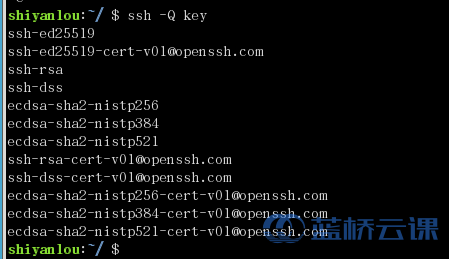
The list of available ciphers may also be obtained using "ssh
-Q cipher".
ClientAliveCountMax
Sets the number of client alive messages which may be sent
without sshd(8) receiving any messages back from the client.
If this threshold is reached while client alive messages are
being sent, sshd will disconnect the client, terminating the
session. It is important to note that the use of client alive
messages is very different from TCPKeepAlive. The client alive
messages are sent through the encrypted channel and therefore
will not be spoofable. The TCP keepalive option enabled by
TCPKeepAlive is spoofable. The client alive mechanism is valu-
able when the client or server depend on knowing when a connec-
tion has become unresponsive.
The default value is 3. If ClientAliveInterval is set to 15,
and ClientAliveCountMax is left at the default, unresponsive
SSH clients will be disconnected after approximately 45 sec-
onds. Setting a zero ClientAliveCountMax disables connection
termination.
ClientAliveInterval
Sets a timeout interval in seconds after which if no data has
been received from the client, sshd(8) will send a message
through the encrypted channel to request a response from the
client. The default is 0, indicating that these messages will
not be sent to the client.
Compression
Specifies whether compression is enabled after the user has au-
thenticated successfully. The argument must be yes, delayed (a
legacy synonym for yes) or no. The default is yes.
DenyGroups
This keyword can be followed by a list of group name patterns,
separated by spaces. Login is disallowed for users whose pri-
mary group or supplementary group list matches one of the pat-
terns. Only group names are valid; a numerical group ID is not
recognized. By default, login is allowed for all groups. The
allow/deny groups directives are processed in the following or-
der: DenyGroups, AllowGroups.
See PATTERNS in ssh_config(5) for more information on patterns.
This keyword may appear multiple times in sshd_config with each
instance appending to the list.
DenyUsers
This keyword can be followed by a list of user name patterns,
separated by spaces. Login is disallowed for user names that
match one of the patterns. Only user names are valid; a numer-
ical user ID is not recognized. By default, login is allowed
for all users. If the pattern takes the form USER@HOST then
USER and HOST are separately checked, restricting logins to
particular users from particular hosts. HOST criteria may ad-
ditionally contain addresses to match in CIDR address/masklen
format. The allow/deny users directives are processed in the
following order: DenyUsers, AllowUsers.
See PATTERNS in ssh_config(5) for more information on patterns.
This keyword may appear multiple times in sshd_config with each
instance appending to the list.
DisableForwarding
Disables all forwarding features, including X11, ssh-agent(1),
TCP and StreamLocal. This option overrides all other forward-
ing-related options and may simplify restricted configurations.
ExposeAuthInfo
Writes a temporary file containing a list of authentication
methods and public credentials (e.g. keys) used to authenticate
the user. The location of the file is exposed to the user ses-
sion through the SSH_USER_AUTH environment variable. The de-
fault is no.
FingerprintHash
Specifies the hash algorithm used when logging key finger-
prints. Valid options are: md5 and sha256. The default is
sha256.
ForceCommand
Forces the execution of the command specified by ForceCommand,
ignoring any command supplied by the client and ~/.ssh/rc if
present. The command is invoked by using the user's login
shell with the -c option. This applies to shell, command, or
subsystem execution. It is most useful inside a Match block.
The command originally supplied by the client is available in
the SSH_ORIGINAL_COMMAND environment variable. Specifying a
command of internal-sftp will force the use of an in-process
SFTP server that requires no support files when used with
ChrootDirectory. The default is none.
GatewayPorts
Specifies whether remote hosts are allowed to connect to ports
forwarded for the client. By default, sshd(8) binds remote
port forwardings to the loopback address. This prevents other
remote hosts from connecting to forwarded ports. GatewayPorts
can be used to specify that sshd should allow remote port for-
wardings to bind to non-loopback addresses, thus allowing other
hosts to connect. The argument may be no to force remote port
forwardings to be available to the local host only, yes to
force remote port forwardings to bind to the wildcard address,
or clientspecified to allow the client to select the address to
which the forwarding is bound. The default is no.
GSSAPIAuthentication
Specifies whether user authentication based on GSSAPI is al-
lowed. The default is no.
GSSAPICleanupCredentials
Specifies whether to automatically destroy the user's creden-
tials cache on logout. The default is yes.
GSSAPIStrictAcceptorCheck
Determines whether to be strict about the identity of the GSS-
API acceptor a client authenticates against. If set to yes
then the client must authenticate against the host service on
the current hostname. If set to no then the client may authen-
ticate against any service key stored in the machine's default
store. This facility is provided to assist with operation on
multi homed machines. The default is yes.
HostbasedAcceptedAlgorithms
Specifies the signature algorithms that will be accepted for
hostbased authentication as a list of comma-separated patterns.
Alternately if the specified list begins with a `+' character,
then the specified signature algorithms will be appended to the
default set instead of replacing them. If the specified list
begins with a `-' character, then the specified signature algo-
rithms (including wildcards) will be removed from the default
set instead of replacing them. If the specified list begins
with a `^' character, then the specified signature algorithms
will be placed at the head of the default set. The default for
this option is:
ssh-ed25519-cert-v01@openssh.com,
ecdsa-sha2-nistp256-cert-v01@openssh.com,
ecdsa-sha2-nistp384-cert-v01@openssh.com,
ecdsa-sha2-nistp521-cert-v01@openssh.com,
sk-ssh-ed25519-cert-v01@openssh.com,
sk-ecdsa-sha2-nistp256-cert-v01@openssh.com,
rsa-sha2-512-cert-v01@openssh.com,
rsa-sha2-256-cert-v01@openssh.com,
ssh-ed25519,
ecdsa-sha2-nistp256,ecdsa-sha2-nistp384,ecdsa-sha2-nistp521,
sk-ssh-ed25519@openssh.com,
sk-ecdsa-sha2-nistp256@openssh.com,
rsa-sha2-512,rsa-sha2-256
The list of available signature algorithms may also be obtained
using "ssh -Q HostbasedAcceptedAlgorithms". This was formerly
named HostbasedAcceptedKeyTypes.
HostbasedAuthentication
Specifies whether rhosts or /etc/hosts.equiv authentication to-
gether with successful public key client host authentication is
allowed (host-based authentication). The default is no.
HostbasedUsesNameFromPacketOnly
Specifies whether or not the server will attempt to perform a
reverse name lookup when matching the name in the ~/.shosts,
~/.rhosts, and /etc/hosts.equiv files during
HostbasedAuthentication. A setting of yes means that sshd(8)
uses the name supplied by the client rather than attempting to
resolve the name from the TCP connection itself. The default
is no.
HostCertificate
Specifies a file containing a public host certificate. The
certificate's public key must match a private host key already
specified by HostKey. The default behaviour of sshd(8) is not
to load any certificates.
HostKey
Specifies a file containing a private host key used by SSH.
The defaults are /etc/ssh/ssh_host_ecdsa_key,
/etc/ssh/ssh_host_ed25519_key and /etc/ssh/ssh_host_rsa_key.
Note that sshd(8) will refuse to use a file if it is
group/world-accessible and that the HostKeyAlgorithms option
restricts which of the keys are actually used by sshd(8).
It is possible to have multiple host key files. It is also
possible to specify public host key files instead. In this
case operations on the private key will be delegated to an
ssh-agent(1).
HostKeyAgent
Identifies the UNIX-domain socket used to communicate with an
agent that has access to the private host keys. If the string
"SSH_AUTH_SOCK" is specified, the location of the socket will
be read from the SSH_AUTH_SOCK environment variable.
HostKeyAlgorithms
Specifies the host key signature algorithms that the server of-
fers. The default for this option is:
ssh-ed25519-cert-v01@openssh.com,
ecdsa-sha2-nistp256-cert-v01@openssh.com,
ecdsa-sha2-nistp384-cert-v01@openssh.com,
ecdsa-sha2-nistp521-cert-v01@openssh.com,
sk-ssh-ed25519-cert-v01@openssh.com,
sk-ecdsa-sha2-nistp256-cert-v01@openssh.com,
rsa-sha2-512-cert-v01@openssh.com,
rsa-sha2-256-cert-v01@openssh.com,
ssh-ed25519,
ecdsa-sha2-nistp256,ecdsa-sha2-nistp384,ecdsa-sha2-nistp521,
sk-ssh-ed25519@openssh.com,
sk-ecdsa-sha2-nistp256@openssh.com,
rsa-sha2-512,rsa-sha2-256
The list of available signature algorithms may also be obtained
using "ssh -Q HostKeyAlgorithms".
IgnoreRhosts
Specifies whether to ignore per-user .rhosts and .shosts files
during HostbasedAuthentication. The system-wide
/etc/hosts.equiv and /etc/ssh/shosts.equiv are still used re-
gardless of this setting.
Accepted values are yes (the default) to ignore all per-user
files, shosts-only to allow the use of .shosts but to ignore
.rhosts or no to allow both .shosts and rhosts.
IgnoreUserKnownHosts
Specifies whether sshd(8) should ignore the user's
~/.ssh/known_hosts during HostbasedAuthentication and use only
the system-wide known hosts file /etc/ssh/ssh_known_hosts. The
default is "no".
Include
Include the specified configuration file(s). Multiple path-
names may be specified and each pathname may contain glob(7)
wildcards that will be expanded and processed in lexical order.
Files without absolute paths are assumed to be in /etc/ssh. An
Include directive may appear inside a Match block to perform
conditional inclusion.
IPQoS Specifies the IPv4 type-of-service or DSCP class for the con-
nection. Accepted values are af11, af12, af13, af21, af22,
af23, af31, af32, af33, af41, af42, af43, cs0, cs1, cs2, cs3,
cs4, cs5, cs6, cs7, ef, le, lowdelay, throughput, reliability,
a numeric value, or none to use the operating system default.
This option may take one or two arguments, separated by white-
space. If one argument is specified, it is used as the packet
class unconditionally. If two values are specified, the first
is automatically selected for interactive sessions and the sec-
ond for non-interactive sessions. The default is af21 (Low-La-
tency Data) for interactive sessions and cs1 (Lower Effort) for
non-interactive sessions.
KbdInteractiveAuthentication
Specifies whether to allow keyboard-interactive authentication.
All authentication styles from login.conf(5) are supported.
The default is yes. The argument to this keyword must be yes
or no. ChallengeResponseAuthentication is a deprecated alias
for this.
KerberosAuthentication
Specifies whether the password provided by the user for
PasswordAuthentication will be validated through the Kerberos
KDC. To use this option, the server needs a Kerberos servtab
which allows the verification of the KDC's identity. The de-
fault is no.
KerberosGetAFSToken
If AFS is active and the user has a Kerberos 5 TGT, attempt to
acquire an AFS token before accessing the user's home direc-
tory. The default is no.
KerberosOrLocalPasswd
If password authentication through Kerberos fails then the
password will be validated via any additional local mechanism
such as /etc/passwd. The default is yes.
KerberosTicketCleanup
Specifies whether to automatically destroy the user's ticket
cache file on logout. The default is yes.
KexAlgorithms
Specifies the available KEX (Key Exchange) algorithms. Multi-
ple algorithms must be comma-separated. Alternately if the
specified list begins with a `+' character, then the specified
algorithms will be appended to the default set instead of re-
placing them. If the specified list begins with a `-' charac-
ter, then the specified algorithms (including wildcards) will
be removed from the default set instead of replacing them. If
the specified list begins with a `^' character, then the speci-
fied algorithms will be placed at the head of the default set.
The supported algorithms are:
curve25519-sha256
curve25519-sha256@libssh.org
diffie-hellman-group1-sha1
diffie-hellman-group14-sha1
diffie-hellman-group14-sha256
diffie-hellman-group16-sha512
diffie-hellman-group18-sha512
diffie-hellman-group-exchange-sha1
diffie-hellman-group-exchange-sha256
ecdh-sha2-nistp256
ecdh-sha2-nistp384
ecdh-sha2-nistp521
sntrup761x25519-sha512@openssh.com
The default is:
sntrup761x25519-sha512@openssh.com,
curve25519-sha256,curve25519-sha256@libssh.org,
ecdh-sha2-nistp256,ecdh-sha2-nistp384,ecdh-sha2-nistp521,
diffie-hellman-group-exchange-sha256,
diffie-hellman-group16-sha512,diffie-hellman-group18-sha512,
diffie-hellman-group14-sha256
The list of available key exchange algorithms may also be ob-
tained using "ssh -Q KexAlgorithms".
ListenAddress
Specifies the local addresses sshd(8) should listen on. The
following forms may be used:
ListenAddress hostname|address [rdomain domain]
ListenAddress hostname:port [rdomain domain]
ListenAddress IPv4_address:port [rdomain domain]
ListenAddress [hostname|address]:port [rdomain domain]
The optional rdomain qualifier requests sshd(8) listen in an
explicit routing domain. If port is not specified, sshd will
listen on the address and all Port options specified. The de-
fault is to listen on all local addresses on the current de-
fault routing domain. Multiple ListenAddress options are per-
mitted. For more information on routing domains, see
rdomain(4).
LoginGraceTime
The server disconnects after this time if the user has not suc-
cessfully logged in. If the value is 0, there is no time
limit. The default is 120 seconds.
LogLevel
Gives the verbosity level that is used when logging messages
from sshd(8). The possible values are: QUIET, FATAL, ERROR,
INFO, VERBOSE, DEBUG, DEBUG1, DEBUG2, and DEBUG3. The default
is INFO. DEBUG and DEBUG1 are equivalent. DEBUG2 and DEBUG3
each specify higher levels of debugging output. Logging with a
DEBUG level violates the privacy of users and is not recom-
mended.
LogVerbose
Specify one or more overrides to LogLevel. An override con-
sists of a pattern lists that matches the source file, function
and line number to force detailed logging for. For example, an
override pattern of:
kex.c:*:1000,*:kex_exchange_identification():*,packet.c:*
would enable detailed logging for line 1000 of kex.c, every-
thing in the kex_exchange_identification() function, and all
code in the packet.c file. This option is intended for debug-
ging and no overrides are enabled by default.
MACs Specifies the available MAC (message authentication code) algo-
rithms. The MAC algorithm is used for data integrity protec-
tion. Multiple algorithms must be comma-separated. If the
specified list begins with a `+' character, then the specified
algorithms will be appended to the default set instead of re-
placing them. If the specified list begins with a `-' charac-
ter, then the specified algorithms (including wildcards) will
be removed from the default set instead of replacing them. If
the specified list begins with a `^' character, then the speci-
fied algorithms will be placed at the head of the default set.
The algorithms that contain "-etm" calculate the MAC after en-
cryption (encrypt-then-mac). These are considered safer and
their use recommended. The supported MACs are:
hmac-md5
hmac-md5-96
hmac-sha1
hmac-sha1-96
hmac-sha2-256
hmac-sha2-512
umac-64@openssh.com
umac-128@openssh.com
hmac-md5-etm@openssh.com
hmac-md5-96-etm@openssh.com
hmac-sha1-etm@openssh.com
hmac-sha1-96-etm@openssh.com
hmac-sha2-256-etm@openssh.com
hmac-sha2-512-etm@openssh.com
umac-64-etm@openssh.com
umac-128-etm@openssh.com
The default is:
umac-64-etm@openssh.com,umac-128-etm@openssh.com,
hmac-sha2-256-etm@openssh.com,hmac-sha2-512-etm@openssh.com,
hmac-sha1-etm@openssh.com,
umac-64@openssh.com,umac-128@openssh.com,
hmac-sha2-256,hmac-sha2-512,hmac-sha1
The list of available MAC algorithms may also be obtained using
"ssh -Q mac".
Match Introduces a conditional block. If all of the criteria on the
Match line are satisfied, the keywords on the following lines
override those set in the global section of the config file,
until either another Match line or the end of the file. If a
keyword appears in multiple Match blocks that are satisfied,
only the first instance of the keyword is applied.
The arguments to Match are one or more criteria-pattern pairs
or the single token All which matches all criteria. The avail-
able criteria are User, Group, Host, LocalAddress, LocalPort,
RDomain, and Address (with RDomain representing the rdomain(4)
on which the connection was received).
The match patterns may consist of single entries or comma-sepa-
rated lists and may use the wildcard and negation operators de-
scribed in the "PATTERNS" section of ssh_config(5).
The patterns in an Address criteria may additionally contain
addresses to match in CIDR address/masklen format, such as
192.0.2.0/24 or 2001:db8::/32. Note that the mask length pro-
vided must be consistent with the address - it is an error to
specify a mask length that is too long for the address or one
with bits set in this host portion of the address. For exam-
ple, 192.0.2.0/33 and 192.0.2.0/8, respectively.
Only a subset of keywords may be used on the lines following a
Match keyword. Available keywords are AcceptEnv,
AllowAgentForwarding, AllowGroups, AllowStreamLocalForwarding,
AllowTcpForwarding, AllowUsers, AuthenticationMethods,
AuthorizedKeysCommand, AuthorizedKeysCommandUser,
AuthorizedKeysFile, AuthorizedPrincipalsCommand,
AuthorizedPrincipalsCommandUser, AuthorizedPrincipalsFile,
Banner, CASignatureAlgorithms, ChannelTimeout, ChrootDirectory,
ClientAliveCountMax, ClientAliveInterval, DenyGroups,
DenyUsers, DisableForwarding, ExposeAuthInfo, ForceCommand,
GatewayPorts, GSSAPIAuthentication,
HostbasedAcceptedAlgorithms, HostbasedAuthentication,
HostbasedUsesNameFromPacketOnly, IgnoreRhosts, Include, IPQoS,
KbdInteractiveAuthentication, KerberosAuthentication, LogLevel,
MaxAuthTries, MaxSessions, PasswordAuthentication,
PermitEmptyPasswords, PermitListen, PermitOpen,
PermitRootLogin, PermitTTY, PermitTunnel, PermitUserRC,
PubkeyAcceptedAlgorithms, PubkeyAuthentication,
PubkeyAuthOptions, RekeyLimit, RevokedKeys, RDomain, SetEnv,
StreamLocalBindMask, StreamLocalBindUnlink, TrustedUserCAKeys,
UnusedConnectionTimeout, X11DisplayOffset, X11Forwarding and
X11UseLocalhost.
MaxAuthTries
Specifies the maximum number of authentication attempts permit-
ted per connection. Once the number of failures reaches half
this value, additional failures are logged. The default is 6.
MaxSessions
Specifies the maximum number of open shell, login or subsystem
(e.g. sftp) sessions permitted per network connection. Multi-
ple sessions may be established by clients that support connec-
tion multiplexing. Setting MaxSessions to 1 will effectively
disable session multiplexing, whereas setting it to 0 will pre-
vent all shell, login and subsystem sessions while still per-
mitting forwarding. The default is 10.
MaxStartups
Specifies the maximum number of concurrent unauthenticated con-
nections to the SSH daemon. Additional connections will be
dropped until authentication succeeds or the LoginGraceTime ex-
pires for a connection. The default is 10:30:100.
Alternatively, random early drop can be enabled by specifying
the three colon separated values start:rate:full (e.g.
"10:30:60"). sshd(8) will refuse connection attempts with a
probability of rate/100 (30%) if there are currently start (10)
unauthenticated connections. The probability increases lin-
early and all connection attempts are refused if the number of
unauthenticated connections reaches full (60).
ModuliFile
Specifies the moduli(5) file that contains the Diffie-Hellman
groups used for the "diffie-hellman-group-exchange-sha1" and
"diffie-hellman-group-exchange-sha256" key exchange methods.
The default is /etc/moduli.
PasswordAuthentication
Specifies whether password authentication is allowed. Note
that passwords may also be accepted via
KbdInteractiveAuthentication. See also UsePAM. The default is
no.
PermitEmptyPasswords
When password authentication is allowed, it specifies whether
the server allows login to accounts with empty password
strings. The default is no.
PermitListen
Specifies the addresses/ports on which a remote TCP port for-
warding may listen. The listen specification must be one of
the following forms:
PermitListen port
PermitListen host:port
Multiple permissions may be specified by separating them with
whitespace. An argument of any can be used to remove all re-
strictions and permit any listen requests. An argument of none
can be used to prohibit all listen requests. The host name may
contain wildcards as described in the PATTERNS section in
ssh_config(5). The wildcard `*' can also be used in place of a
port number to allow all ports. By default all port forwarding
listen requests are permitted. Note that the GatewayPorts op-
tion may further restrict which addresses may be listened on.
Note also that ssh(1) will request a listen host of "localhost"
if no listen host was specifically requested, and this name is
treated differently to explicit localhost addresses of
"127.0.0.1" and "::1".
PermitOpen
Specifies the destinations to which TCP port forwarding is per-
mitted. The forwarding specification must be one of the fol-
lowing forms:
PermitOpen host:port
PermitOpen IPv4_addr:port
PermitOpen [IPv6_addr]:port
Multiple forwards may be specified by separating them with
whitespace. An argument of any can be used to remove all re-
strictions and permit any forwarding requests. An argument of
none can be used to prohibit all forwarding requests. The
wildcard `*' can be used for host or port to allow all hosts or
ports respectively. Otherwise, no pattern matching or address
lookups are performed on supplied names. By default all port
forwarding requests are permitted.
PermitRootLogin
Specifies whether root can log in using ssh(1). The argument
must be yes, prohibit-password, forced-commands-only, or no.
The default is no. Note that if
ChallengeResponseAuthentication and UsePAM are both yes, this
setting may be overridden by the PAM policy.
If this option is set to prohibit-password (or its deprecated
alias, without-password), password and keyboard-interactive au-
thentication are disabled for root.
If this option is set to forced-commands-only, root login with
public key authentication will be allowed, but only if the
command option has been specified (which may be useful for tak-
ing remote backups even if root login is normally not allowed).
All other authentication methods are disabled for root.
If this option is set to no, root is not allowed to log in.
PermitTTY
Specifies whether pty(4) allocation is permitted. The default
is yes.
PermitTunnel
Specifies whether tun(4) device forwarding is allowed. The ar-
gument must be yes, point-to-point (layer 3), ethernet (layer
2), or no. Specifying yes permits both point-to-point and
ethernet. The default is no.
Independent of this setting, the permissions of the selected
tun(4) device must allow access to the user.
PermitUserEnvironment
Specifies whether ~/.ssh/environment and environment= options
in ~/.ssh/authorized_keys are processed by sshd(8). Valid op-
tions are yes, no or a pattern-list specifying which environ-
ment variable names to accept (for example "LANG,LC_*"). The
default is no. Enabling environment processing may enable
users to bypass access restrictions in some configurations us-
ing mechanisms such as LD_PRELOAD.
PermitUserRC
Specifies whether any ~/.ssh/rc file is executed. The default
is yes.
PerSourceMaxStartups
Specifies the number of unauthenticated connections allowed
from a given source address, or "none" if there is no limit.
This limit is applied in addition to MaxStartups, whichever is
lower. The default is none.
PerSourceNetBlockSize
Specifies the number of bits of source address that are grouped
together for the purposes of applying PerSourceMaxStartups lim-
its. Values for IPv4 and optionally IPv6 may be specified,
separated by a colon. The default is 32:128, which means each
address is considered individually.
PidFile
Specifies the file that contains the process ID of the SSH dae-
mon, or none to not write one. The default is
/var/run/sshd.pid.
Port Specifies the port number that sshd(8) listens on. The default
is 22. Multiple options of this type are permitted. See also
ListenAddress.
PrintLastLog
Specifies whether sshd(8) should print the date and time of the
last user login when a user logs in interactively. The default
is yes.
PrintMotd
Specifies whether sshd(8) should print /etc/motd when a user
logs in interactively. (On some systems it is also printed by
the shell, /etc/profile, or equivalent.) The default is yes.
PubkeyAcceptedAlgorithms
Specifies the signature algorithms that will be accepted for
public key authentication as a list of comma-separated pat-
terns. Alternately if the specified list begins with a `+'
character, then the specified algorithms will be appended to
the default set instead of replacing them. If the specified
list begins with a `-' character, then the specified algorithms
(including wildcards) will be removed from the default set in-
stead of replacing them. If the specified list begins with a
`^' character, then the specified algorithms will be placed at
the head of the default set. The default for this option is:
ssh-ed25519-cert-v01@openssh.com,
ecdsa-sha2-nistp256-cert-v01@openssh.com,
ecdsa-sha2-nistp384-cert-v01@openssh.com,
ecdsa-sha2-nistp521-cert-v01@openssh.com,
sk-ssh-ed25519-cert-v01@openssh.com,
sk-ecdsa-sha2-nistp256-cert-v01@openssh.com,
rsa-sha2-512-cert-v01@openssh.com,
rsa-sha2-256-cert-v01@openssh.com,
ssh-ed25519,
ecdsa-sha2-nistp256,ecdsa-sha2-nistp384,ecdsa-sha2-nistp521,
sk-ssh-ed25519@openssh.com,
sk-ecdsa-sha2-nistp256@openssh.com,
rsa-sha2-512,rsa-sha2-256
The list of available signature algorithms may also be obtained
using "ssh -Q PubkeyAcceptedAlgorithms".
PubkeyAuthOptions
Sets one or more public key authentication options. The sup-
ported keywords are: none (the default; indicating no addi-
tional options are enabled), touch-required and
verify-required.
The touch-required option causes public key authentication us-
ing a FIDO authenticator algorithm (i.e. ecdsa-sk or
ed25519-sk) to always require the signature to attest that a
physically present user explicitly confirmed the authentication
(usually by touching the authenticator). By default, sshd(8)
requires user presence unless overridden with an autho-
rized_keys option. The touch-required flag disables this over-
ride.
The verify-required option requires a FIDO key signature attest
that the user was verified, e.g. via a PIN.
Neither the touch-required or verify-required options have any
effect for other, non-FIDO, public key types.
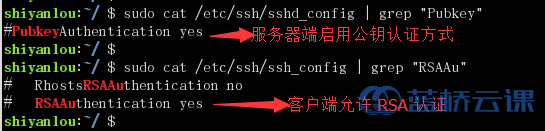
PubkeyAuthentication
Specifies whether public key authentication is allowed. The
default is yes.
RekeyLimit
Specifies the maximum amount of data that may be transmitted or
received before the session key is renegotiated, optionally
followed by a maximum amount of time that may pass before the
session key is renegotiated. The first argument is specified
in bytes and may have a suffix of `K', `M', or `G' to indicate
Kilobytes, Megabytes, or Gigabytes, respectively. The default
is between `1G' and `4G', depending on the cipher. The op-
tional second value is specified in seconds and may use any of
the units documented in the "TIME FORMATS" section. The de-
fault value for RekeyLimit is default none, which means that
rekeying is performed after the cipher's default amount of data
has been sent or received and no time based rekeying is done.
RequiredRSASize
Specifies the minimum RSA key size (in bits) that sshd(8) will
accept. User and host-based authentication keys smaller than
this limit will be refused. The default is 1024 bits. Note
that this limit may only be raised from the default.
RevokedKeys
Specifies revoked public keys file, or none to not use one.
Keys listed in this file will be refused for public key authen-
tication. Note that if this file is not readable, then public
key authentication will be refused for all users. Keys may be
specified as a text file, listing one public key per line, or
as an OpenSSH Key Revocation List (KRL) as generated by
ssh-keygen(1). For more information on KRLs, see the KEY REVO-
CATION LISTS section in ssh-keygen(1).
RDomain
Specifies an explicit routing domain that is applied after au-
thentication has completed. The user session, as well as any
forwarded or listening IP sockets, will be bound to this
rdomain(4). If the routing domain is set to %D, then the do-
main in which the incoming connection was received will be ap-
plied.
SecurityKeyProvider
Specifies a path to a library that will be used when loading
FIDO authenticator-hosted keys, overriding the default of using
the built-in USB HID support.
SetEnv Specifies one or more environment variables to set in child
sessions started by sshd(8) as "NAME=VALUE". The environment
value may be quoted (e.g. if it contains whitespace charac-
ters). Environment variables set by SetEnv override the de-
fault environment and any variables specified by the user via
AcceptEnv or PermitUserEnvironment.
StreamLocalBindMask
Sets the octal file creation mode mask (umask) used when creat-
ing a Unix-domain socket file for local or remote port forward-
ing. This option is only used for port forwarding to a Unix-
domain socket file.
The default value is 0177, which creates a Unix-domain socket
file that is readable and writable only by the owner. Note
that not all operating systems honor the file mode on Unix-do-
main socket files.
StreamLocalBindUnlink
Specifies whether to remove an existing Unix-domain socket file
for local or remote port forwarding before creating a new one.
If the socket file already exists and StreamLocalBindUnlink is
not enabled, sshd will be unable to forward the port to the
Unix-domain socket file. This option is only used for port
forwarding to a Unix-domain socket file.
The argument must be yes or no. The default is no.
StrictModes
Specifies whether sshd(8) should check file modes and ownership
of the user's files and home directory before accepting login.
This is normally desirable because novices sometimes acciden-
tally leave their directory or files world-writable. The de-
fault is yes. Note that this does not apply to
ChrootDirectory, whose permissions and ownership are checked
unconditionally.
Subsystem
Configures an external subsystem (e.g. file transfer daemon).
Arguments should be a subsystem name and a command (with op-
tional arguments) to execute upon subsystem request.
The command sftp-server implements the SFTP file transfer sub-
system.
Alternately the name internal-sftp implements an in-process
SFTP server. This may simplify configurations using
ChrootDirectory to force a different filesystem root on
clients.
By default no subsystems are defined.
SyslogFacility
Gives the facility code that is used when logging messages from
sshd(8). The possible values are: DAEMON, USER, AUTH, LOCAL0,
LOCAL1, LOCAL2, LOCAL3, LOCAL4, LOCAL5, LOCAL6, LOCAL7. The
default is AUTH.
TCPKeepAlive
Specifies whether the system should send TCP keepalive messages
to the other side. If they are sent, death of the connection
or crash of one of the machines will be properly noticed. How-
ever, this means that connections will die if the route is down
temporarily, and some people find it annoying. On the other
hand, if TCP keepalives are not sent, sessions may hang indefi-
nitely on the server, leaving "ghost" users and consuming
server resources.
The default is yes (to send TCP keepalive messages), and the
server will notice if the network goes down or the client host
crashes. This avoids infinitely hanging sessions.
To disable TCP keepalive messages, the value should be set to
no.
TrustedUserCAKeys
Specifies a file containing public keys of certificate authori-
ties that are trusted to sign user certificates for authentica-
tion, or none to not use one. Keys are listed one per line;
empty lines and comments starting with `#' are allowed. If a
certificate is presented for authentication and has its signing
CA key listed in this file, then it may be used for authentica-
tion for any user listed in the certificate's principals list.
Note that certificates that lack a list of principals will not
be permitted for authentication using TrustedUserCAKeys. For
more details on certificates, see the CERTIFICATES section in
ssh-keygen(1).
UnusedConnectionTimeout
Specifies whether and how quickly sshd(8) should close client
connections with no open channels. Open channels include ac-
tive shell, command execution or subsystem sessions, connected
network, socket, agent or X11 forwardings. Forwarding listen-
ers, such as those from the ssh(1) -R flag, are not considered
as open channels and do not prevent the timeout. The timeout
value is specified in seconds or may use any of the units docu-
mented in the "TIME FORMATS" section.
Note that this timeout starts when the client connection com-
pletes user authentication but before the client has an oppor-
tunity to open any channels. Caution should be used when using
short timeout values, as they may not provide sufficient time
for the client to request and open its channels before termi-
nating the connection.
The default none is to never expire connections for having no
open channels. This option may be useful in conjunction with
ChannelTimeout.
UseBlacklist
Specifies whether sshd(8) attempts to send authentication suc-
cess and failure messages to the blacklistd(8) daemon. The de-
fault is no. For forward compatibility with an upcoming
blacklistd rename, the UseBlocklist alias can be used instead.
UseDNS Specifies whether sshd(8) should look up the remote host name,
and to check that the resolved host name for the remote IP ad-
dress maps back to the very same IP address.
If this option is set to no, then only addresses and not host
names may be used in ~/.ssh/authorized_keys from and
sshd_config Match Host directives. The default is "yes".
UsePAM Enables the Pluggable Authentication Module interface. If set
to yes this will enable PAM authentication using
KbdInteractiveAuthentication and PasswordAuthentication in ad-
dition to PAM account and session module processing for all au-
thentication types.
Because PAM keyboard-interactive authentication usually serves
an equivalent role to password authentication, you should dis-
able either PasswordAuthentication or
KbdInteractiveAuthentication.
If UsePAM is enabled, you will not be able to run sshd(8) as a
non-root user. The default is yes.
VersionAddendum
Optionally specifies additional text to append to the SSH pro-
tocol banner sent by the server upon connection. The default
is "FreeBSD-20240104". The value none may be used to disable
this.
X11DisplayOffset
Specifies the first display number available for sshd(8)'s X11
forwarding. This prevents sshd from interfering with real X11
servers. The default is 10.
X11Forwarding
Specifies whether X11 forwarding is permitted. The argument
must be yes or no. The default is no.
When X11 forwarding is enabled, there may be additional expo-
sure to the server and to client displays if the sshd(8) proxy
display is configured to listen on the wildcard address (see
X11UseLocalhost), though this is not the default. Addition-
ally, the authentication spoofing and authentication data veri-
fication and substitution occur on the client side. The secu-
rity risk of using X11 forwarding is that the client's X11 dis-
play server may be exposed to attack when the SSH client re-
quests forwarding (see the warnings for ForwardX11 in
ssh_config(5)). A system administrator may have a stance in
which they want to protect clients that may expose themselves
to attack by unwittingly requesting X11 forwarding, which can
warrant a no setting.
Note that disabling X11 forwarding does not prevent users from
forwarding X11 traffic, as users can always install their own
forwarders.
X11UseLocalhost
Specifies whether sshd(8) should bind the X11 forwarding server
to the loopback address or to the wildcard address. By de-
fault, sshd binds the forwarding server to the loopback address
and sets the hostname part of the DISPLAY environment variable
to localhost. This prevents remote hosts from connecting to
the proxy display. However, some older X11 clients may not
function with this configuration. X11UseLocalhost may be set
to no to specify that the forwarding server should be bound to
the wildcard address. The argument must be yes or no. The de-
fault is yes.
XAuthLocation
Specifies the full pathname of the xauth(1) program, or none to
not use one. The default is /usr/local/bin/xauth.
TIME FORMATS
sshd(8) command-line arguments and configuration file options that
specify time may be expressed using a sequence of the form:
time[qualifier], where time is a positive integer value and qualifier
is one of the following:
<none> seconds
s | S seconds
m | M minutes
h | H hours
d | D days
w | W weeks
Each member of the sequence is added together to calculate the total
time value.
Time format examples:
600 600 seconds (10 minutes)
10m 10 minutes
1h30m 1 hour 30 minutes (90 minutes)
TOKENS
Arguments to some keywords can make use of tokens, which are expanded
at runtime:
%% A literal `%'.
%C Identifies the connection endpoints, containing four space-
separated values: client address, client port number,
server address, and server port number.
%D The routing domain in which the incoming connection was re-
ceived.
%F The fingerprint of the CA key.
%f The fingerprint of the key or certificate.
%h The home directory of the user.
%i The key ID in the certificate.
%K The base64-encoded CA key.
%k The base64-encoded key or certificate for authentication.
%s The serial number of the certificate.
%T The type of the CA key.
%t The key or certificate type.
%U The numeric user ID of the target user.
%u The username.
AuthorizedKeysCommand accepts the tokens %%, %C, %D, %f, %h, %k, %t,
%U, and %u.
AuthorizedKeysFile accepts the tokens %%, %h, %U, and %u.
AuthorizedPrincipalsCommand accepts the tokens %%, %C, %D, %F, %f, %h,
%i, %K, %k, %s, %T, %t, %U, and %u.
AuthorizedPrincipalsFile accepts the tokens %%, %h, %U, and %u.
ChrootDirectory accepts the tokens %%, %h, %U, and %u.
RoutingDomain accepts the token %D.
FILES
/etc/ssh/sshd_config
Contains configuration data for sshd(8). This file should be
writable by root only, but it is recommended (though not neces-
sary) that it be world-readable.
SEE ALSO
sftp-server(8), sshd(8)
AUTHORS
OpenSSH is a derivative of the original and free ssh 1.2.12 release by
Tatu Ylonen. Aaron Campbell, Bob Beck, Markus Friedl, Niels Provos,
Theo de Raadt and Dug Song removed many bugs, re-added newer features
and created OpenSSH. Markus Friedl contributed the support for SSH
protocol versions 1.5 and 2.0. Niels Provos and Markus Friedl con-
tributed support for privilege separation.
FreeBSD 13.2 July 28, 2023 SSHD_CONFIG(5)
|