import tensorflow as tf import matplotlib.pyplot as plt %matplotlib inline import numpy as np import glob import os
打印Tensorflow版本 1 print('Tensorflow version:{}'.format(tf.__version__))
打印是否支持GPU加速 1 print(tf.test.is_gpu_available())
设置keras与layers(方便调用) 1 2 keras = tf.keras layers = tf.keras.layers
读取train、test数据集图片路径 1 2 train_image_path = glob.glob('./dc_2000/train/*.jpg') test_image_path = glob.glob('./dc_2000/test/*.jpg')
将路径的图片名称提取出来 1 2 train_image_label = [label.split('\\')[1].split('.')[0] for label in train_image_path] test_image_label = [label.split('\\')[1].split('.')[0] for label in test_image_path]
图片label有哪些 1 label_names = np.unique(train_image_label)#返回单个不重复元素的列表
标签与下标之间的转换
1 label_to_index = dict((name,i) for i,name in enumerate(label_names))
1 index_to_label = dict((i,name) for name,i in label_to_index.items())
train_label和test_label转index 1 2 3 #cat -> 0 ,dog -> 1 train_image_label = [label_to_index.get(name) for name in train_image_label] test_image_label = [label_to_index.get(name) for name in test_image_label]
图片加载函数 1 2 3 4 5 6 7 8 def load_preprosess_image(path,label): image = tf.io.read_file(path)#读取 image = tf.image.decode_jpeg(image,channels=3)#channel默认0,因为是彩色图像有RGB三个通道 image = tf.image.resize(image,[256,256])#resize image = tf.cast(image,tf.float32)#改变数据类型 image = image /255#归一化 # label = tf.reshape(label,[1])#变化维度 [1,2,3] -> [[1],[2],[3]] return image,label
设置AUTOTUNE 1 AUTOTUNE = tf.data.experimental.AUTOTUNE#AUTOTUNE根据CPU的个数自动使用进行运算
设置train_Dataset 1 2 train_image_ds = tf.data.Dataset.from_tensor_slices((train_image_path,train_image_label))#train图片路径与对应label train_image_ds = train_image_ds.map(load_preprosess_image,num_parallel_calls=AUTOTUNE)#num_parallel_calls是cpu个数,默认None,传入AUTOTUNE可以最大限度发挥速度(并行运算)
设置test_Dataset 1 2 test_image_ds = tf.data.Dataset.from_tensor_slices((test_image_path,test_image_label))#test图片路径与对应label test_image_ds = test_image_ds.map(load_preprosess_image,num_parallel_calls=AUTOTUNE)#num_parallel_calls是cpu个数,默认None,传入AUTOTUNE可以最大限度发挥速度(并行运算)
定义BATCH_SIZE大小 1 2 # 设置BATCH BATCH_SIZE = 32
获取train、test的数据长度 1 2 train_count = len(train_image_path) test_count = len(test_image_path)
对train_Dataset数据进行乱序、定义批次和加速运行 1 2 train_image_ds = train_image_ds.shuffle(train_count).repeat().batch(BATCH_SIZE)#buffer_size 多大范围进行乱序 train_image_ds = train_image_ds.prefetch(AUTOTUNE)#在后台,一部分数据进行训练过程中读取另外一部分数据,能加速训练过程,prefetch(buffer_size) 让计算机自己计算
对test_Dataset数据定义批次和加速运行 1 2 test_image_ds = test_image_ds.repeat().batch(BATCH_SIZE)#buffer_size 多大范围进行乱序 test_image_ds = test_image_ds.prefetch(AUTOTUNE)#在后台,一部分数据进行训练过程中读取另外一部分数据,能加速训练过程,prefetch(buffer_size) 让计算机自己计算
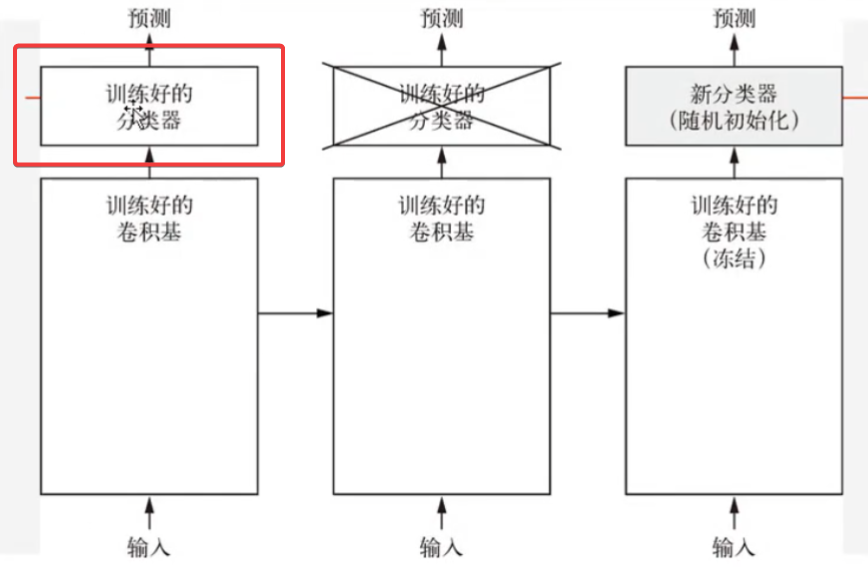
==Datasetimgs,labels = next(iter(train_image_ds))#iter转换成生成器,next下一批次数据是iter可以进行迭代== keras 内置经典网络实现 VGG16 1 covn_base = keras.applications.VGG16(weights='imagenet',include_top=False)#weights='imagenet'使用VGG的预训练权重,不使用None;include_to是否引入训练好的分类器(False只引入卷积基)
Xception 1 2 3 4 covn_base = keras.applications.xception.Xception(weights='imagenet', include_top=False,#weights='imagenet'使用预训练权重,不使用None;include_to是否引入训练好的分类器(False只引入卷积基) input_shape=(256,256,3),#图片输入 pooling='avg')
冻结预训练模型(将预训练卷积基权重设置为不可训练) 1 covn_base.trainable = False #将covn_base 的权重设置为不可训练(卷积基设置为不可训练)
模型搭建 VGG16 1 2 3 4 5 model = keras.Sequential()#顺序模型 model.add(covn_base)#添加VGG16 model.add(layers.GlobalAveragePooling2D())#类类似latten,将后面三维扁平成为一维,.GlobalAveragePooling2D更高效,效果更好 model.add(layers.Dense(512,activation='relu')) model.add(layers.Dense(1,activation='sigmoid'))
Xception 1 2 3 4 model = keras.Sequential()#顺序模型 model.add(covn_base)#添加VGG16 pooling='avg' 在输出时添加了GlobalPooling2D,不用再添加GlobalPooling2D model.add(layers.Dense(512,activation='relu')) model.add(layers.Dense(1,activation='sigmoid'))
设置Compile 1 2 3 4 model.compile(optimizer=keras.optimizers.Adam(learning_rate=0.0005), loss=keras.losses.binary_crossentropy,#loss='binary_crossentropy' metrics=['accuracy'] #metrics=['acc'] )
模型训练 1 2 3 4 5 6 7 history = model.fit( train_image_ds, steps_per_epoch=train_count//BATCH_SIZE, epochs=5, validation_data=test_image_ds, validation_steps=test_count//BATCH_SIZE )
==模型微调==
冻结模型库的底部的卷积层, 共同训练新添加的分类器层和顶部部分卷积层。
==微调步骤==
在预训练卷积基上添加自定义层
冻结卷积基所有层
训练添加的分类层
==解冻卷积基的一部分层==
联合训练解冻的卷积层和添加的自定义层}
预训练模型解冻 1 2 #将预训练的全部解冻 covn_base.trainable = True
查看层数 设置微调层 1 fine_tune_at = -3#调整最后三层,倒数三层
冻结非微调层 1 2 for layer in covn_base.layers[:fine_tune_at]: layer.trainable = False#倒数第三层以前都冻结
设置Compile 1 2 3 4 model.compile(optimizer=keras.optimizers.Adam(learning_rate=0.0005/10),#要更低的学习速率来嗅探 loss=keras.losses.binary_crossentropy,#loss='binary_crossentropy' metrics=['accuracy'] #metrics=['acc'] )
训练 1 2 3 4 5 6 7 8 9 10 11 inital_epochs = 5 # 前面训练的次数 fine_tune_epochs = 5 #对新的数据进行训练次数 total_epochs = inital_epochs + fine_tune_epochs history = model.fit( train_image_ds, steps_per_epoch=train_count//BATCH_SIZE, epochs=total_epochs,#总共epoch initial_epoch=inital_epochs,#初始训练epoch validation_data=test_image_ds, validation_steps=test_count//BATCH_SIZE )
epochs=total_epochs,#总共epoch
initial_epoch=inital_epochs,#初始训练epoch