TensorFlow 安装
目录
[GPU安装:(对于NVIDIA显卡,要求CUDA Compute Capability须不低于3.5 参考地址英伟达算力,NVIDIA驱动>=450.80.02)](#GPU安装:(对于NVIDIA显卡,要求CUDA Compute Capability须不低于3.5 参考地址英伟达算力,NVIDIA驱动>=450.80.02))
[ 安装依赖的库:](# 安装依赖的库:)
CPU安装:
1 | pip install tensorflow==2.8.0 -i https://pypi.doubanio.com/simple #安装版本位2.8.0的,不加默认最新版本 |
安装依赖库:
1 | pip install pandas matplotlib notebook -i https://pypi.doubanio.com/simple |
GPU安装:(对于NVIDIA显卡,要求CUDA Compute Capability须不低于3.5 参考地址英伟达算力,NVIDIA驱动>=450.80.02)
1 | nvidia-smi |
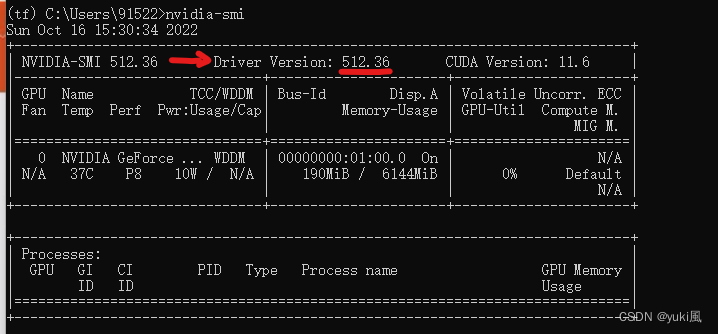 编辑
编辑
安装Tensorflow-gpu 与对应的cuda等,这样就不用去在NVIDIA官网再下
1 | conda install tensorflow-gpu=2.6.0 |
 编辑
编辑
安装依赖的库:
1 | pip install pandas matplotlib notebook keras==2.6.0 -i https://pypi.douban.com/simple |
查看是否安装成功:
1 | import tensorflow as tf |

安装ipykernel
base环境中安装ipykernel
1 | pip install ipykernel |
将虚拟环境写入Notebook的kernel中
1 | python -m ipykernel install --user --name 环境名称 --display-name "Python(环境名称)" |
activate虚拟环境名称,进入虚拟环境
安装notebook
1 | pip install notebook |
进入notebook
1 | ipython notebook |
查看jupyter核
1 | jupyter kernelspec list |
删除其中某个核
1 | jupyter kernelspec remove 环境名称 |
本博客所有文章除特别声明外,均采用 CC BY-NC-SA 4.0 许可协议。转载请注明来源 YuKiFuHaNeの博客!
相关推荐

2023-07-14
GPU的使用与分配
获得当前主机上运算设备列表1234gpus = tf.config.experimental.list_physical_devices(device_type='GPU')cpus = tf.config.experimental.list_physical_devices(device_type='CPU') 设置当前程序可见的设备范围当前程序只会使用自己可见的设备,不可见的设备不 会被当前程序使用,因此可以设置当前程序可见的设 备范围。1234gpus=tf.config.experimental.list_physical_devices(device_type='GPU')#可见设备范围tf.config.experimental.set_visible_devices(devices=gpus[0:2], device_type='GPU')#设置前两快可见 指定程序只在显卡 2,3 上运行。12import osos.environ['CUDA_VISIBLE_DEVIC...

2023-07-14
多目标的定位与识别
2023-07-14
tf.data 模块说明
tf.data模块API 基于 tf.data API,我们可以使用简单的代码来构建复 杂的输入, tf.data API 可以轻松处理大量数据、不同的数据格式 以及复杂的转换 tf.data API 最重要的概念: tf.data.Dataset 表示一系列元素 tf.data.Dataset中每个元素包含一个或多个 Tensor 对象。例如,在图 片管道中,一个元素可能是单个训练样本,具有一对 表示图片数据和标签的张量。 通过两种不同的方式来创建tf.data.Dataset 直接从 Tensor 创建 Dataset 例如 Dataset.from_tensor_slices()); 当然 Numpy 也是可以的,TensorFlow 会自动将其转 换为 Tensor。 通过对一个或多个 tf.data.Dataset 对象来使用变换 (例如 Dataset.zip)来创建 Dataset。 认识Dataset一个 Dataset 对象包含多个元素,每个元素的结构都 相同。每个元素包含一个或多个 tf.Tensor 对象,这些 对象被称为组件。 Dataset 的属性由构...

2024-03-11
Tesla vGPU 安装与授权
对于 Proxmox VE 8,需要使用16.0+版本的 vGPU 驱动程序,低版本的驱动程序不支持 Linux 6.x 内核 最近我刚升级了我的 NAS 主机,并且购买了一块 Tesla P4 显卡。我想把 vGPU 分配给虚拟机上的 Jellyfin 容器硬解使用,经过几天的研究,我简单总结了使用方法。关于如何使用硬解,我会在下一篇文章中进行说明。 术语说明简单介绍后面内容中的几个术语: vGPU vGPU 技术通过将硬件 GPU 分割成多个虚拟 GPU 以支持多个虚拟机。每个虚拟 GPU 可以被分配给不同的虚拟机,从而使多个虚拟机拥有“独显”。 vGPU-unlock 从硬件上来看,同代的数据中心显卡和消费者显卡 GPU 架构是一样的,只是驱动层限制了支持的特性。通过修改型号与宿主驱动等方式,将消费级显卡伪装成具有相同核心型号的专业卡,使得普通消费者显卡也可以支持虚拟化;对于虚拟机,同时在 vGPU 启动前后进行 hook,绕过特定检查、汇报虚假结果等,使得虚拟机的 vGPU 能正常启动。目前支持的消费卡型号可以参考此文章。 vGPU 授权机制 在宿主机上,驱动无...

2025-08-13
VMware Workstation 安装配置
1. 在 Fedora 41/40/39 上安装 VMware Workstation Pro1.1 下载 VMware Workstation Pro您需要 Broadcom 帐户,然后转到[VMWare Workstation Pro 下载页面](https://support.broadcom.com/group/ecx/productdownloads?subfamily=VMware Workstation Pro&freeDownloads=true)并下载最新版本,目前为 17.6.3。 1.2 检查 sha256sum1sha256sum ~/Downloads/VMware-Workstation-Full-17.6.3-24583834.x86_64.bundle 1.3 使 VMware-Workstation-Full-17.6.1-24319023.x86_64.bundle 可执行1chmod +x ~/Downloads/VMware-Workstation-Full-17.6.3-24583834.x86_6...